What is Vesika?
Vesika is an AI-assisted workspace for lawyers and legal teams. Researching a legal question together with its sources, finding case law, having a petition or a contract drafted, reviewing a document, calculating interest or attorney's fees and tracking deadlines all happen in one place.
The web app: vesika.ai/app. There is also an iPhone app: iPhone app.
What you can do with Vesika
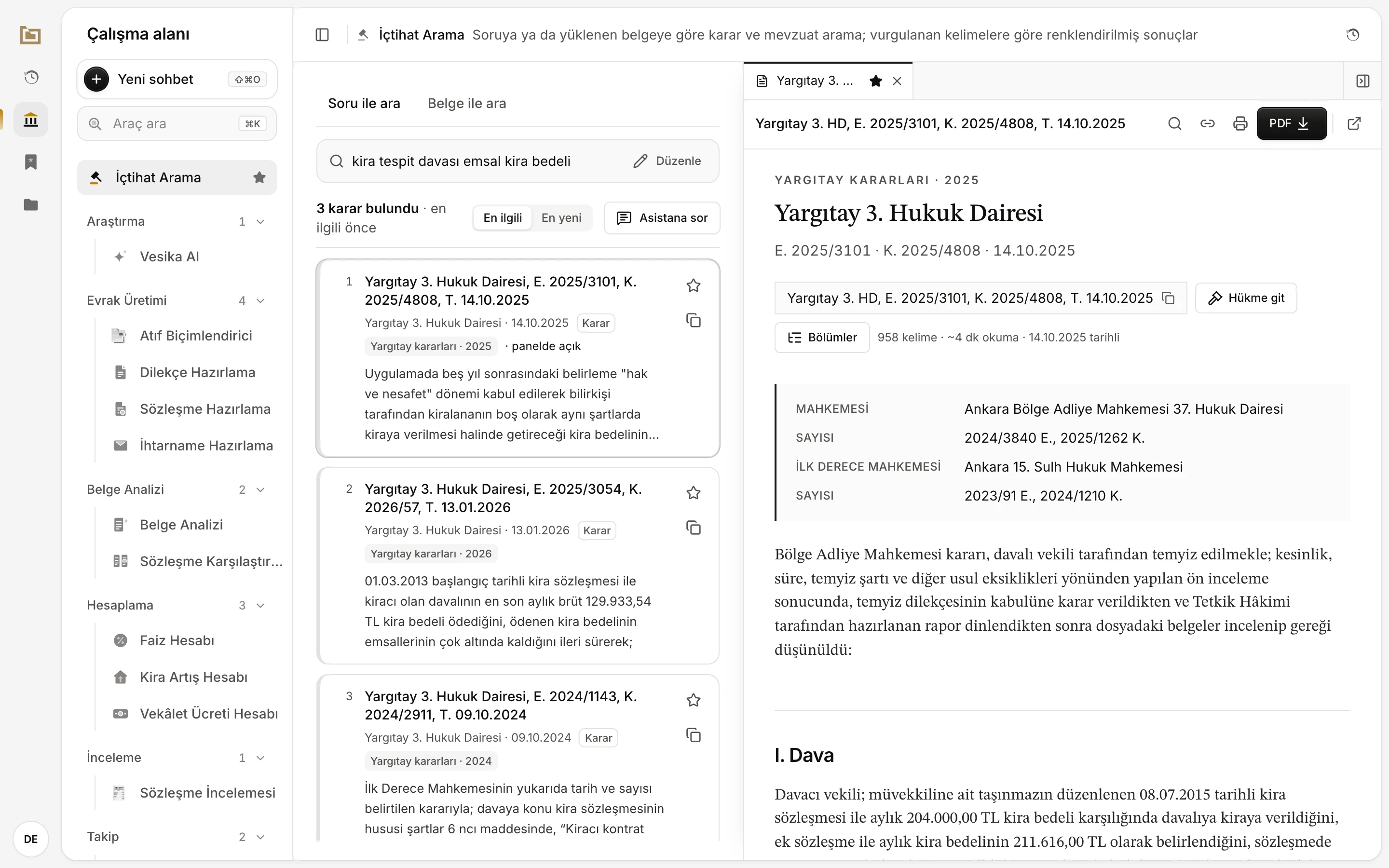
- Every tool is listed here, grouped by category.
- The tool you pick opens in the middle; here, a case-law search.
- Decisions and laws open in the side panel with the source's full text.
The tools sit in the list on the left under these headings:
| Heading | Tools | What they are for |
|---|---|---|
| Araştırma (Research) | Vesika AI, İçtihat Arama (Case-law search) | Asking about Turkish law and your own documents; searching decisions and legislation by a question or an uploaded document. |
| Evrak Üretimi (Document drafting) | Dilekçe Hazırlama (Petition drafting), İhtarname Hazırlama (Formal notice drafting), Sözleşme Hazırlama (Contract drafting), Atıf Biçimlendirici (Citation formatter) | Getting a draft petition, formal notice or contract by describing the facts; putting citations to decisions into one format. |
| Belge Analizi (Document analysis) | Belge Analizi (Document analysis), Sözleşme Karşılaştırma (Contract comparison) | Assessing a contract, petition or formal notice from your side's point of view; comparing contract versions clause by clause. |
| İnceleme (Review) | Sözleşme İncelemesi (Contract review) | Flagging risky clauses in a contract and getting suggested revisions. |
| Hesaplama (Calculation) | Faiz Hesabı (Interest calculator), Kira Artış Hesabı (Rent increase calculator), Vekâlet Ücreti Hesabı (Attorney's fee calculator) | Interest, the legal maximum rent increase, and attorney's fees under the Minimum Attorney Fee Tariff. |
| Takip (Tracking) | Süre Takibi (Deadline tracking), İcra / Maaş Haczi Takibi (Enforcement and wage garnishment tracking) | A calendar of limitation and forfeiture periods; following wage garnishment deductions and collections. |
The account menu also holds Kurum Şablonları (Firm templates): your firm's petition, contract and formal-notice templates and its letterhead. Your organisation can add modules of its own; they appear in the same list under their own headings.
Answers with sources
When Vesika AI answers a question, it shows the decisions, statutory articles and documents it relied on as numbered sources. Click a source and its text opens in the side panel, so you can read what the answer rests on at the source. What the legal database covers: Coverage and sources.
AI answers and drafts can be wrong or incomplete. Before you use an answer, read the cited decisions and articles at their source; review every draft yourself.
Accounts
You cannot sign up for Vesika yourself. Accounts are created by your firm's or organisation's administrator, who also sets your plan and limits. If you have no account or have forgotten your password, contact your administrator. Details: Signing in, Plans and limits.
Web and iPhone
You use Vesika in a browser at vesika.ai/app; on a narrow screen (a phone's browser, for example) the interface switches to a single column. There is also an iPhone app with Vesika AI, İçtihat Arama, the document reader and your favorites; you sign in with the same account. Details: iPhone app.
The interface language
Vesika's interface is in Turkish only. This guide writes every button and menu label in bold exactly as the app shows it, followed by its English meaning in parentheses the first time it appears on a page, e.g. Yeni sohbet (New chat), so you can match what you read to what you see.
What is in this guide
- Getting started: signing in, the workspace, history and favorites, files, account and settings, plans and limits, keyboard shortcuts.
- Vesika AI: asking a question, reading an answer, the side panel, the document reader, attaching files, having documents drafted, managing conversations and tips.
- Tools: one page per tool, for example Case-law search, Petition drafting, Interest calculator.
- iPhone app: installing and signing in and the app's sections.
- Administration: for administrators, user management, module management, rates and data sources.
- Help: frequently asked questions, troubleshooting and coverage.