Plans and limits
Your account's plan decides which tools you can use in Vesika. Your administrator assigns the plan and the limits; plans are not bought inside the app. This page describes the plans, what a locked tool looks like and the limit notices you may see.
Your plan: the account menu (your initials at the bottom left) and Ayarlar (Settings) → the Hesap (Account) card.
Plans
There are four plans. Each plan includes everything the plans below it include.
| Plan | Description in the app (English meaning) |
|---|---|
| Ücretsiz (Free) | Temel araç setine üyelikle erişim. (Access to the basic tool set with an account.) |
| Başlangıç (Starter) | Günlük araştırma ve taslak hazırlama araçları. (Everyday research and drafting tools.) |
| Pro | Bireysel avukatlar için tüm yapay zekâ analiz araçları. (Every AI analysis tool, for individual lawyers.) |
| Büro (Firm) | Pro'daki her şey, ekipler için. (Everything in Pro, for teams.) |
Your administrator decides which plan a tool needs. An administrator can open a module to "a given plan and above"; on accounts below that plan the tool stays in the list but shows as locked.
If your plan has an end date, it shows as Plan bitişi (Plan ends) in the Hesap card of Ayarlar. When fewer than seven days are left, a notice appears right under the tool's header: "Kullanım süreniz N gün içinde (date) sona eriyor." (Your access ends in N days.) You can dismiss it for the visit with Kapat (×, Close). When the date passes, your account falls back to the Ücretsiz plan until your administrator extends it.
In some places the app shows a plan's short code: free (Ücretsiz), starter (Başlangıç), pro (Pro), firm (Büro). For example, the account menu may read Free Planı (Free plan), and a locked tool may carry a starter label.
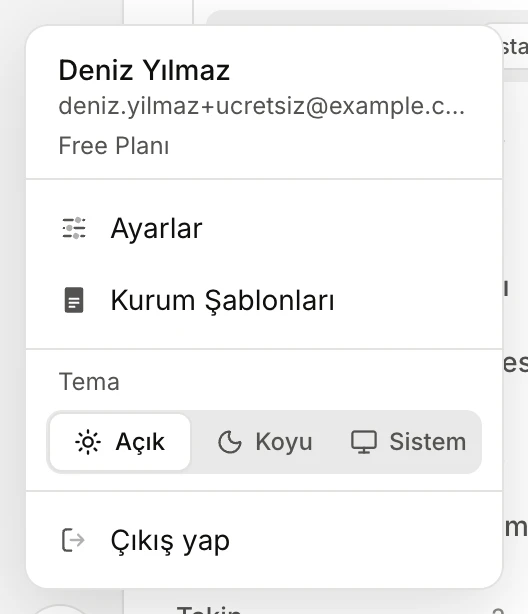
- Your account's plan. This account is on the Ücretsiz (Free) plan.
A locked tool
A tool your plan does not cover is still listed under Çalışma alanı (Workspace); next to its name is the short code of the plan it needs.
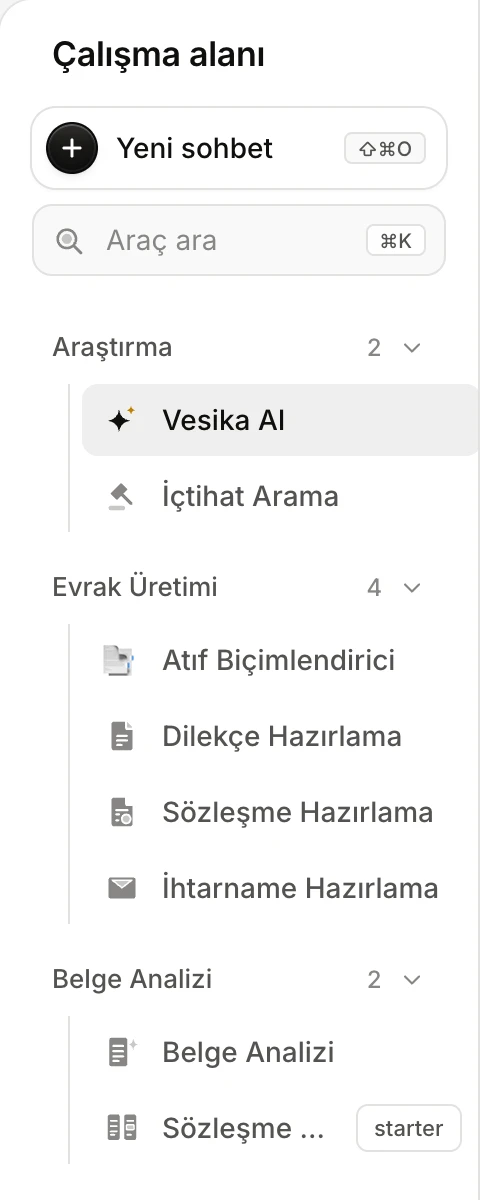
- A locked tool stays in the list; open it to see what it needs.
- The plan it needs: starter, that is Başlangıç (Starter) and above.
When you open a locked tool, a card appears in its place:
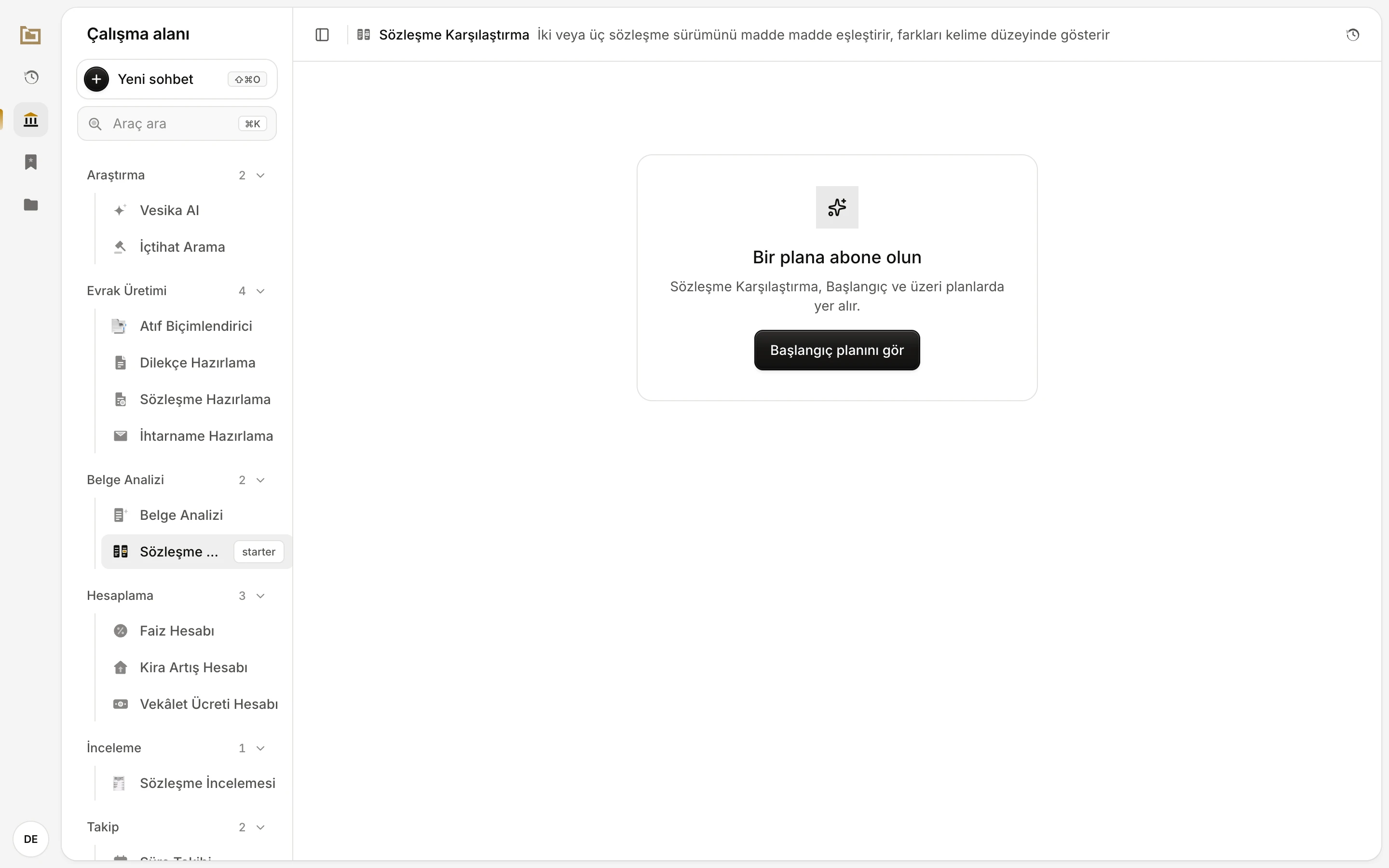
- Bir plana abone olun (Subscribe to a plan): your plan does not cover this tool.
- The plan (and above) that includes the tool.
- Başlangıç planını gör (See the Starter plan) shows what the plan includes.
The window that opens from the button lists the plan you need, your current plan and what the plans up to it include:
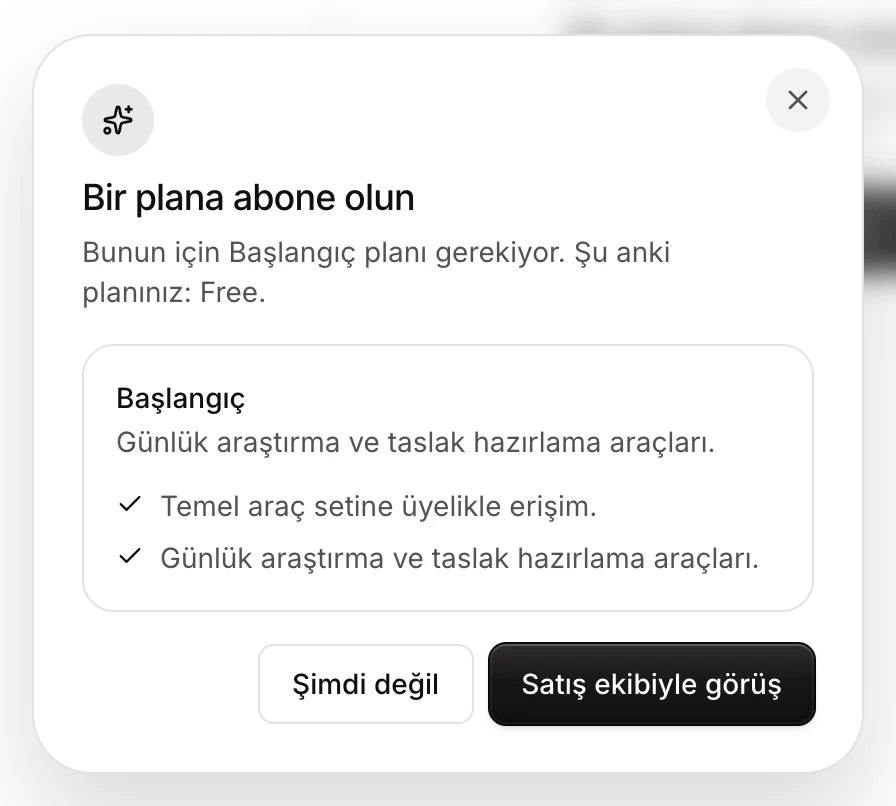
- The plan you need and your current plan.
- The needed plan's description and what it covers.
- Satış ekibiyle görüş (Talk to sales) and Şimdi değil (Not now) both close the window; nothing is bought inside the app.
To upgrade, ask your administrator or whoever manages your agreement with Vesika.
Some actions inside a tool can depend on the plan too. When you try one, the same Bir plana abone olun window opens.
Other kinds of lock
A tool also stays closed in two other cases:
- Bu araç yönetime açık (This tool is for administration): the tool is only for administrator accounts. Administration tools are not listed at all for other people; you only see this card if you open one through a link.
- Hesabınızda kullanılamıyor (Not available on your account): the tool is in a trial stage and open only to accounts in that programme.
If your administrator has opened a module to selected people only, or switched it off for your account, the module does not appear in your list at all.
Company accounts
If your account belongs to a company (a law firm, for example):
- The company's plan replaces your own. Ayarlar shows a Şirket (Company) line and the company's plan.
- The company's end date replaces yours; when fewer than seven days are left, the notice names the company ("… kullanım süresi N gün içinde (date) sona eriyor.").
- The AI, deep-research and storage limits your administrator sets for the company are shared by everyone in it.
- If the company has a colour and a logo, the workspace takes that colour and the company's logo replaces the Vesika logo at the top of the section rail.
AI usage limit
Your administrator can set an AI spending limit for your account or your company. Usage is measured over the past month. As you approach and reach the limit, a notice line appears right under the tool's header:
- Past 80% of the limit: "Aylık yapay zekâ kotanızın %N'ini kullandınız ($spent / $limit)." (You have used N% of your monthly AI quota.) You can dismiss it for the visit with Kapat (×).
- At the limit: "Yapay zekâ harcama sınırınıza ulaştınız (…). Sınırı yükseltmek için yöneticinizle görüşün." (You have reached your AI spending limit. Talk to your administrator to raise it.) For a company limit the message names the company and says the limit is shared by all its users. This notice cannot be dismissed.
Once the limit is reached, Vesika AI and the AI features of the tools refuse requests; features that do not use AI are not affected. Your administrator can raise the limit; as the period moves on, older spending drops out of the count.
If usage cannot be checked at that moment, accounts with a limit are refused: "Yapay zekâ harcamanız şu anda doğrulanamıyor, bu yüzden istek reddedildi. Lütfen biraz sonra tekrar deneyin." (Your AI spending cannot be verified right now, so the request was refused. Please try again shortly.)
Deep-research allowance
In Vesika AI, the Derin (Deep) option under Derinlik (Depth) can be limited to a monthly allowance. When there is one, the option list shows what is left next to Derin (for example "bu ay 3/5", 3 of 5 left this month); once it is used up it reads "bu ay doldu" (used up this month) and the option cannot be chosen. The allowance renews on the first day of each month (Turkish time); until then you can continue with a faster depth. On company accounts the allowance is shared by everyone in the company. Details: Asking a question.
Storage limit
Files you upload and files the tools produce are kept in the Dosyalar (Files) section. Your administrator can set a storage limit (in MB) for them; on company accounts the limit is shared. Your usage is shown at the bottom of Dosyalar. When the limit is reached, new files cannot be kept and this notice appears once: "Hesabınızın dosya depolama sınırı (… MB) doldu. Dosyalar'dan eski dosyaları silebilir ya da yöneticinizden sınırı artırmasını isteyebilirsiniz." (Your account's file storage limit is full. You can delete old files in Dosyalar or ask your administrator to raise the limit.) Details: Files.
Limits and things to note
- Only administrators change plans, limits and end dates; you cannot change them as a user.
- There is no screen showing how much AI you have used; you only see a notice as you approach and reach the limit.
Related pages
- Account and settings
- Files
- The workspace
- User management (for administrators)
- Module management (for administrators)