Sources and coverage
When Vesika AI answers a question and when Case-law search looks for a case, both search the same legal database. This page explains which sources that database holds, how to limit a search to particular sources, and what you will not find in Vesika.
Which sources does Vesika search?
The sources below are in Vesika's legal database. Each links to the official site where its documents are published, so you can check a document you found in Vesika there too.
Legislation (Mevzuat)
- Mevzuat Bilgi Sistemi (Legislation Information System): laws, decree-laws, regulations under statute (tüzük), presidential decrees, decisions and circulars, by-laws, communiqués
- SPK Mevzuatı (Capital Markets Board legislation)
Court decisions
- Yargıtay Karar Arama (Court of Cassation)
- UYAP Emsal Karar Arama (UYAP precedent search)
- Danıştay Karar Arama (Council of State)
- Uyuşmazlık Mahkemesi (Court of Jurisdictional Disputes)
- İstanbul Barosu Karar Arşivi (Istanbul Bar Association decision archive)
Constitutional review
- AYM Bireysel Başvuru Kararları (Constitutional Court, individual applications)
- AYM Norm Denetimi Kararları (norm review)
- AYM Siyasi Parti Kararları (political party cases)
- AYM Yüce Divan Kararları (Supreme Criminal Tribunal)
- AYM Yasama Dokunulmazlığı Kararları (parliamentary immunity)
Regulatory board decisions
- Rekabet Kurulu Kararları (Competition Board)
- Reklam Kurulu Kararları (Advertising Board)
- KVKK Kurul Kararları (Personal Data Protection Board decisions)
- KVKK Kurul Karar Özetleri (decision summaries)
- RTÜK Üst Kurul Kararları (Radio and Television Supreme Council)
- BTK Kurul Kararları (Information and Communication Technologies Authority)
- EPDK Kurul Kararları (Energy Market Regulatory Authority)
Court of Accounts (Sayıştay)
- Sayıştay Genel Kurul Kararları (General Assembly)
- Sayıştay Temyiz Kurulu Kararları (Appeals Board)
- Sayıştay Daire Kararları (Chambers)
Sources in preparation
Coverage for BDDK (Banking Regulation and Supervision Agency), the Sigorta Tahkim Komisyonu (Insurance Arbitration Commission) and GİB özelgeleri (Revenue Administration tax rulings) is being prepared. Do not treat them as covered by Vesika yet; research their decisions and rulings on their own sites.
Narrowing a search by source
By default Vesika searches the whole database. When you want to work only with a particular court's or authority's decisions, use the source picker.

- The question box.
- The Hukuk veritabanı (Legal database) button and a summary of the current choice.
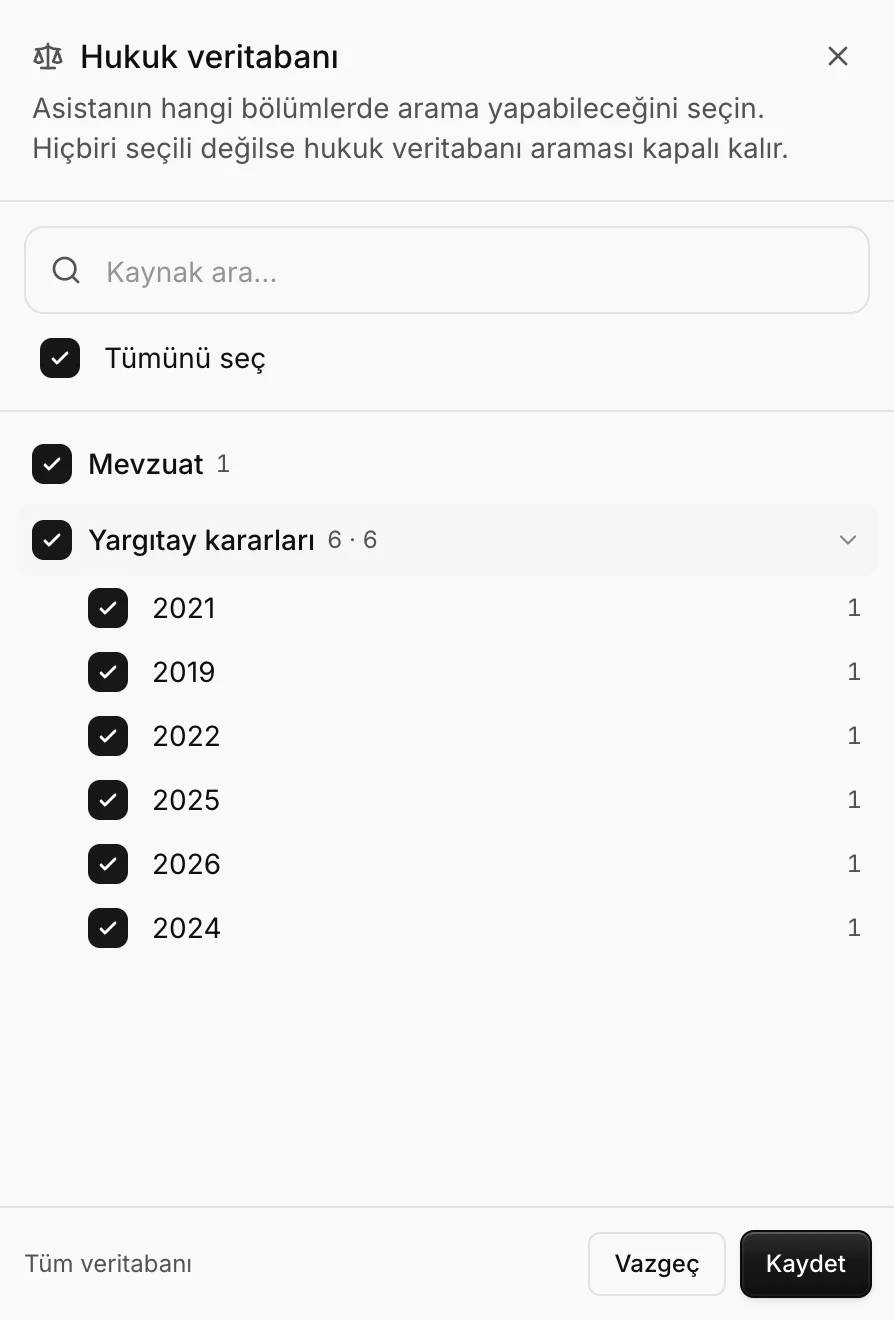
- Kaynak ara… (Search sources): filters by group or source name.
- Tümünü seç (Select all): selects every source, or clears the selection.
- A source group: its box selects the whole group; the arrow opens its sub-sources.
- How many sources are selected, Vazgeç (Cancel) and Kaydet (Save).
The sources and document counts in the screenshot come from a small sample database prepared for this guide. In the real database, all of the sources above are listed with their own counts.
In Vesika AI
- Click Hukuk veritabanı · Tüm veritabanı (Legal database · Whole database) below the question box. You can also open the same panel with Kaynakları seç (Choose sources) in the question box's + menu.
- Sources are listed in groups: Mevzuat (Legislation), Anayasa Mahkemesi (Constitutional Court), Yargıtay kararları (Court of Cassation decisions), Danıştay kararları (Council of State decisions), UYAP kararları (UYAP decisions), Uyuşmazlık Mahkemesi, Sayıştay kararları, KVKK kararları, Rekabet Kurumu (Competition Authority) and the other boards. The figures next to a group are its number of sub-sources and its document count.
- Tick a group's box to select or clear the whole group. If only part of a group is selected, the box shows a mixed state.
- Click a group's name to see its sub-sources; Court of Cassation decisions, for example, are split by year and legislation by type. Tick them one by one.
- To find a source, type its name in Kaynak ara… (Search sources).
- Click Kaydet (Save). The summary on the button shows your choice: Tüm veritabanı (Whole database), … kaynak (… sources) or Kapalı (Off).
Your choice is saved to your account and applies to your next questions too. To go back to the whole database, open the panel and tick Tümünü seç (Select all).
If you select no source in Vesika AI, legal database search is turned off: the panel says "Kaynak seçilmedi. Arama kapalı." (No source selected. Search is off.) and the button shows Kapalı (Off). Vesika AI then answers without searching sources; check the answer's citations with particular care.
In Case-law search
In Case-law search's filters, the Kaynak / mahkeme (Source / court) button opens the same panel (it reads Tüm kaynaklar, All sources, at first). There you must select at least one source; the choice applies only to that search's filters. See Case-law search for details.
What is not covered?
- Sources not on the list. Do not assume that documents of a court, authority or publication not listed above are in Vesika's database. The sources in preparation (BDDK, Insurance Arbitration Commission, GİB tax rulings) are not covered yet either.
- Your own documents. The contract, petition or expert report in your file is not in the database. Attach them to a question.
- Undated documents, in searches with a date range. For some documents the database cannot determine a date. When you put a date limit on a search, these documents are left out.
- The very latest publications. The database is updated from its sources at intervals. A decision or amendment just published on an official site may not have reached Vesika yet; check current legislation against the official text.
Limits and things to check
- The decisions and legislation Vesika finds are real documents, but the conclusions Vesika AI draws from them can be wrong. Open every citation in an answer and read the document itself (see Reading an answer).
- A source being in the database does not mean every document on that source's official site is in Vesika. When you find nothing on a subject, search the official site as well.
- Narrowing the sources does not make results faster or better; it only leaves out the sources you did not choose. If unsure, search the whole database.