Interest calculator
Faiz Hesabı (Interest calculator) works out the interest a claim accrues up to a given date. It splits the calculation at every rate change and at every principal, expense and payment date, and offsets partial payments against expenses, interest and principal in the order you choose. Use it to prepare the interest item of an enforcement request, a formal notice or a statement of claim, and to check the other side's figures.
Workspace → Hesaplama (Calculation) → Faiz Hesabı
The calculation follows fixed rules applied to the values you enter and the rate table; no AI is involved. The same inputs and the same rates always give the same result.
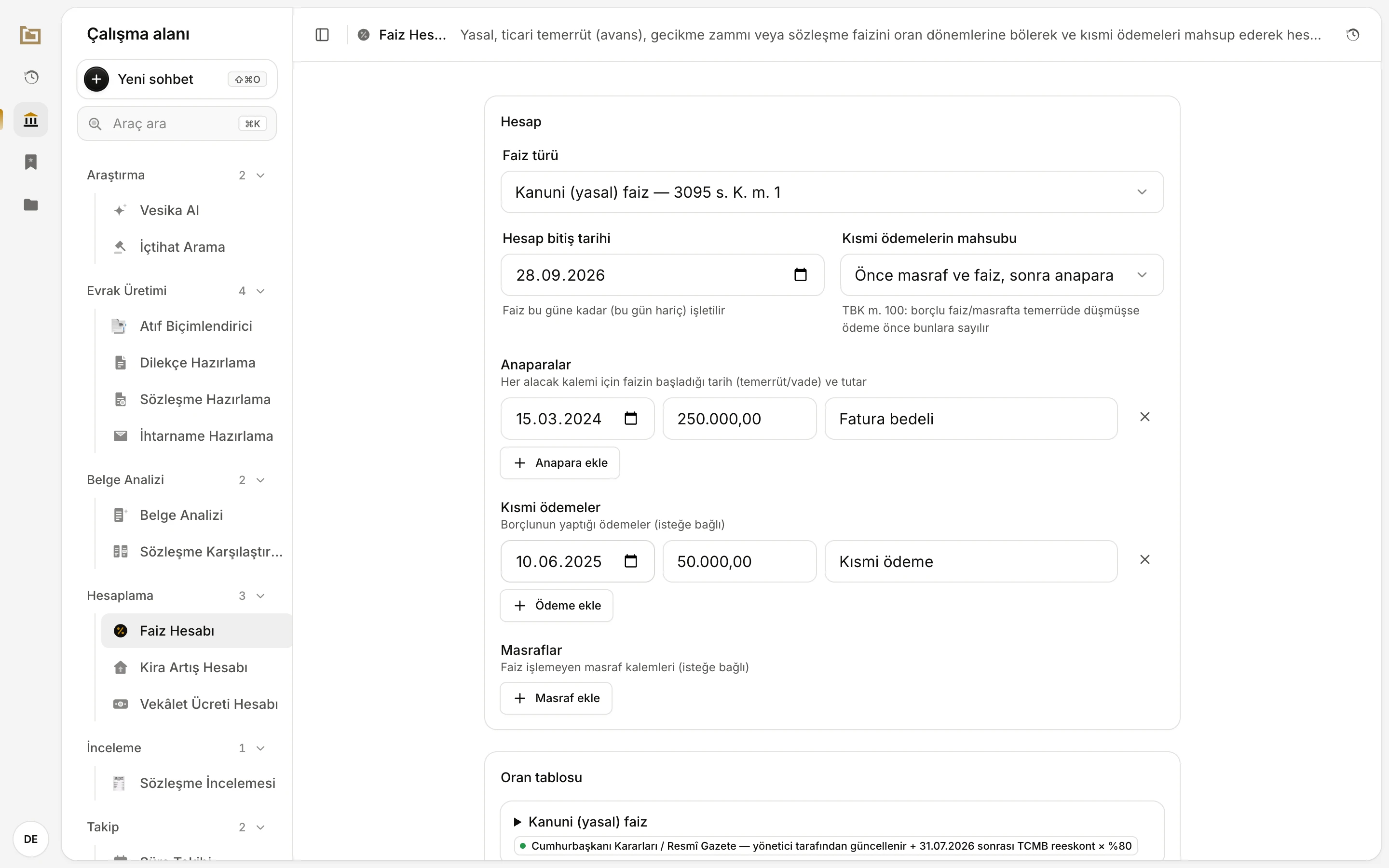
- Faiz Hesabı is in the Hesaplama (Calculation) group of the workspace.
- The Hesap (Calculation) card: interest type, end date, offsetting order, principals, payments and expenses.
- Oran tablosu (Rate table): the rates the calculation uses and where they come from.
Step by step
- Choose the interest to apply in Faiz türü (Interest type).
- Enter the Hesap bitiş tarihi (Calculation end date). It opens with today's date.
- Under Anaparalar (Principals), enter the date interest starts (default or due date) and the amount. For more than one claim item, click Anapara ekle (Add principal).
- If the debtor paid something, click Ödeme ekle (Add payment) and enter the payment date and amount. Use Masraf ekle (Add expense) for costs that do not bear interest.
- If there are payments, choose the offsetting order in Kısmi ödemelerin mahsubu (Offsetting partial payments).
- The Sonuç (Result) card updates as you type; there is no separate "calculate" button. Check the result and the period table, then save, copy or download it.
Write amounts in Turkish format, 250.000,00; 250000, 250.000 and 250000,5 are accepted too. An amount that cannot be read shows Tutarı 1.234,56 biçiminde girin. (Enter the amount as 1.234,56) under it, and that row is left out.
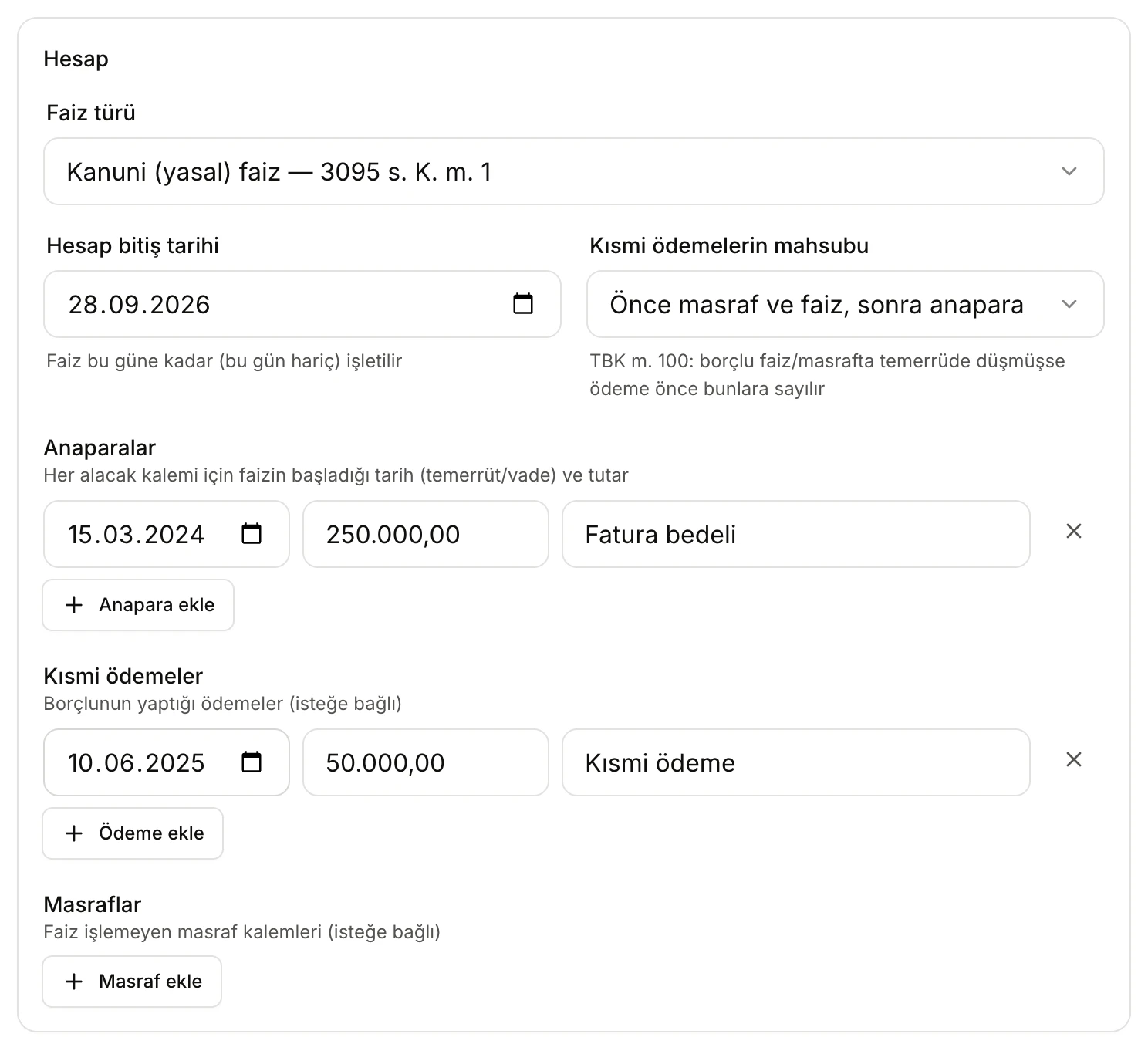
- Faiz türü (Interest type): statutory interest, commercial default interest, late-payment surcharge or a contractual rate.
- Hesap bitiş tarihi (End date): interest runs up to this day; the day itself is not counted.
- Kısmi ödemelerin mahsubu: whether a payment goes first to expenses and interest, or to principal.
- A principal row: start date, amount and an optional description.
- A partial payment row. Remove a row with ×.
- Masraf ekle (Add expense): cost items that do not bear interest.
Interest types
Faiz türü offers four options:
| Option | When | Rate applied |
|---|---|---|
| Kanuni (yasal) faiz — 3095 s. K. m. 1 (statutory interest) | Ordinary claims where no interest was agreed | The statutory interest table. From 31.07.2026, 80% of the TCMB rediscount rate on 31 December of the previous year |
| Ticari temerrüt faizi (avans) — 3095 s. K. m. 2/2 (commercial default interest) | Default interest in commercial matters | The TCMB short-term advance rate; on any day where it is lower than statutory interest, statutory interest |
| Kamu alacağı gecikme zammı — 6183 s. K. m. 51 (late-payment surcharge on public receivables) | Public receivables | The monthly surcharge rate |
| Sözleşme / özel oran (Contractual / custom rate) | An annual rate agreed in the contract | The rate you enter in the rate table |
The advance rate and, from 31.07.2026, statutory interest follow the half-year rule of Law 3095: the whole year runs on the rate in force on 31 December of the previous year. If the rate on 30 June differs from it by 5 points or more, the 30 June rate applies from 1 July.
With Ticari temerrüt faizi, each period compares the advance rate with statutory interest. Where statutory interest is higher, the description column of the period table says Kanuni faiz (avans oranından yüksek) (statutory interest, higher than the advance rate).
With Sözleşme / özel oran, the rate table opens expanded. It starts with a single row (24.00% a year). Change it to the contract's rate, and add a row if the rate changed later. If your rate exceeds twice the statutory rate in any period, the result shows a warning. It recalls the limits of TBK art. 120/2 for agreed default interest and TBK art. 88/2 for contractual interest, and notes that under TTK art. 8/1 these limits do not apply between merchants.
Dates and day count
- Interest on each principal starts from its own date. The calculation starts at the earliest principal date.
- The Hesap bitiş tarihi is not counted. Days are "end − start": the first day counts, the last day does not.
- A payment, expense or principal dated after the end date is left out. A note under the result says which one.
- A payment or expense dated before the first principal is processed on the first principal's date; a note says so.
- When several things happen on the same day, the order is: principal, then expense, then payment.
- If the end date is before the first principal date, nothing is calculated: Hesap bitiş tarihi, ilk anapara tarihinden önce olamaz. (The end date cannot be before the first principal date.)
Partial payments and offsetting
Kısmi ödemelerin mahsubu has two options:
- Önce masraf ve faiz, sonra anapara (Expenses and interest first, then principal): a payment first covers outstanding expenses, then the interest accrued up to that day, and the rest reduces the principal. The hint under the field recalls TBK art. 100: if the debtor is in default on interest or costs, a payment is counted against those first.
- Önce anapara (Principal first): a payment first reduces the principal, then interest, and expenses last.
Once a payment reduces the principal, interest runs on the remaining principal from the payment date. Unpaid interest is not added to the principal and bears no interest itself (Law 3095 art. 3). If payments exceed the total owed, the excess is shown as fazla ödeme (overpayment).
Masraflar (Expenses) bear no interest; they are only added to the total owed and paid off according to the offsetting order.
Reading the result
In the example, statutory interest runs on a principal of 250,000.00 TL from 15.03.2024 to 28.09.2026, and a partial payment of 50,000.00 TL was made on 10.06.2025. The interest accrued by the payment date was more than the payment, so the whole payment went to interest and the principal did not change.
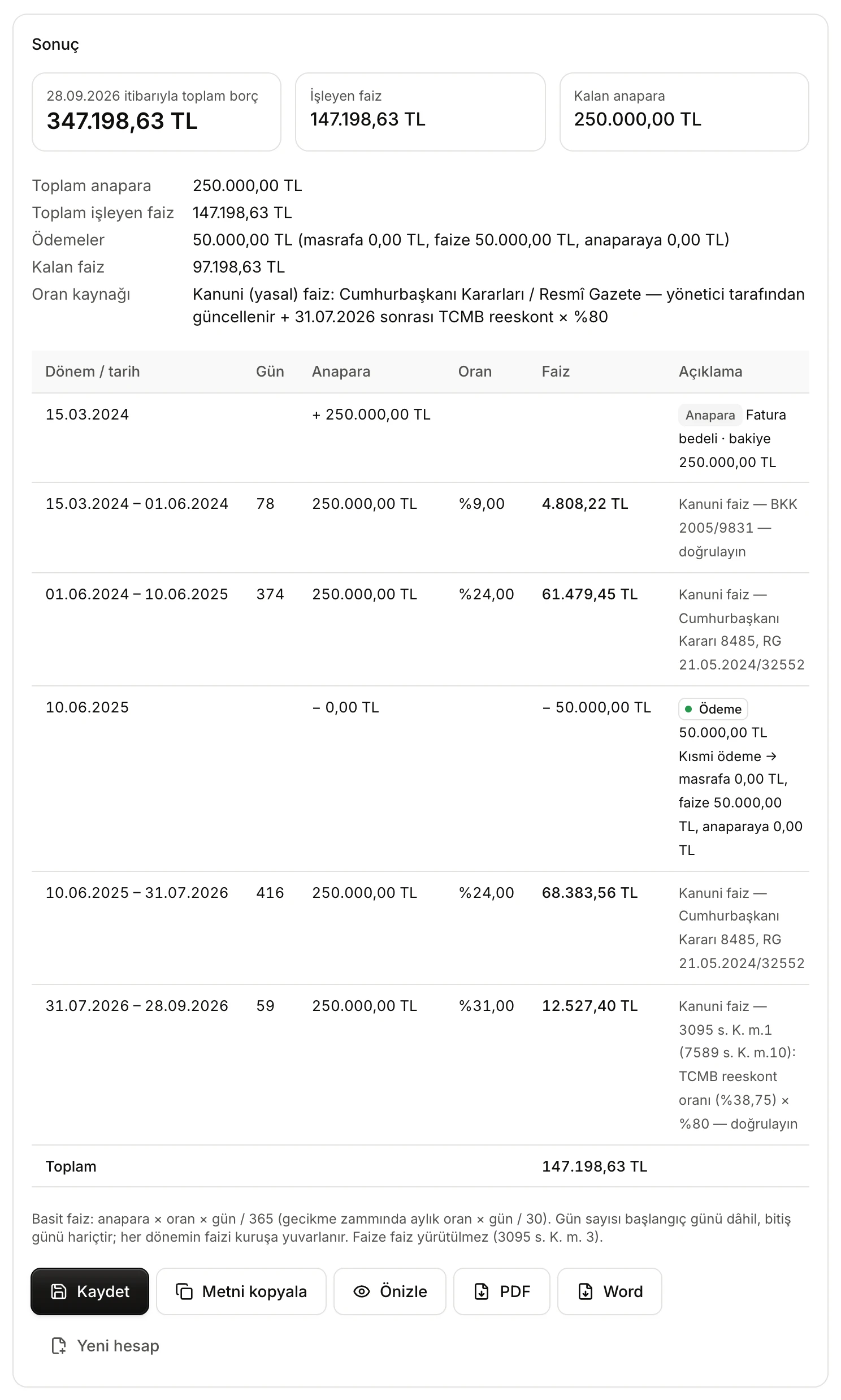
- Total owed at the end date, İşleyen faiz (Interest accrued) and Kalan anapara (Remaining principal).
- How much of the payments went to expenses, interest and principal.
- Oran kaynağı (Rate source): where the tables used in the calculation come from.
- An interest period: date range, days, principal, rate, interest and the legal basis of the rate.
- A payment row: how the payment was offset.
- Save, copy, preview and download buttons.
The Sonuç card contains:
- Summary boxes: the total owed at the end date (remaining principal + remaining interest + remaining expenses), total interest accrued and remaining principal.
- Totals: Toplam anapara (Total principal), Toplam işleyen faiz (Total interest accrued), Masraflar (Expenses) if any, Ödemeler (Payments, split into expenses, interest and principal), Kalan faiz (Remaining interest), Kalan masraf (Remaining expenses) if any, and Oran kaynağı.
- Period table: each row is an interest period or an event (Anapara principal, Masraf expense, Ödeme payment). Interest periods fill the Gün (Days), Anapara, Oran (Rate) and Faiz (Interest) columns. The Açıklama (Description) column shows the basis of the rate (for example the decree, or the date of the TCMB rate). For the late-payment surcharge the rate is followed by /ay (per month). The Toplam row at the bottom is the total interest.
- Method note: simple interest: principal × rate × days / 365 for annual rates, monthly rate × days / 30 for the surcharge. Each period's interest is rounded to the kuruş, and the table adds up those rounded amounts.
- Notes: dates left out, periods the rate table does not cover, overpayment and the contractual rate limit appear as blue notes at the bottom of the card.
If the table has no rate for a date, nothing is calculated and an error titled Hesap yapılamadı (Could not calculate) names the missing date. Add a row to the rate table that covers it. If the calculation runs past the last day a table is known to be complete for, the result says the last rate in the table was assumed after that date. If a new rate has been announced, add it to the table.
The rate table
The Oran tablosu card shows the tables the selected interest type uses. For Ticari temerrüt faizi, it lists both the advance-rate table and the statutory interest table. Click a table's title to open it.
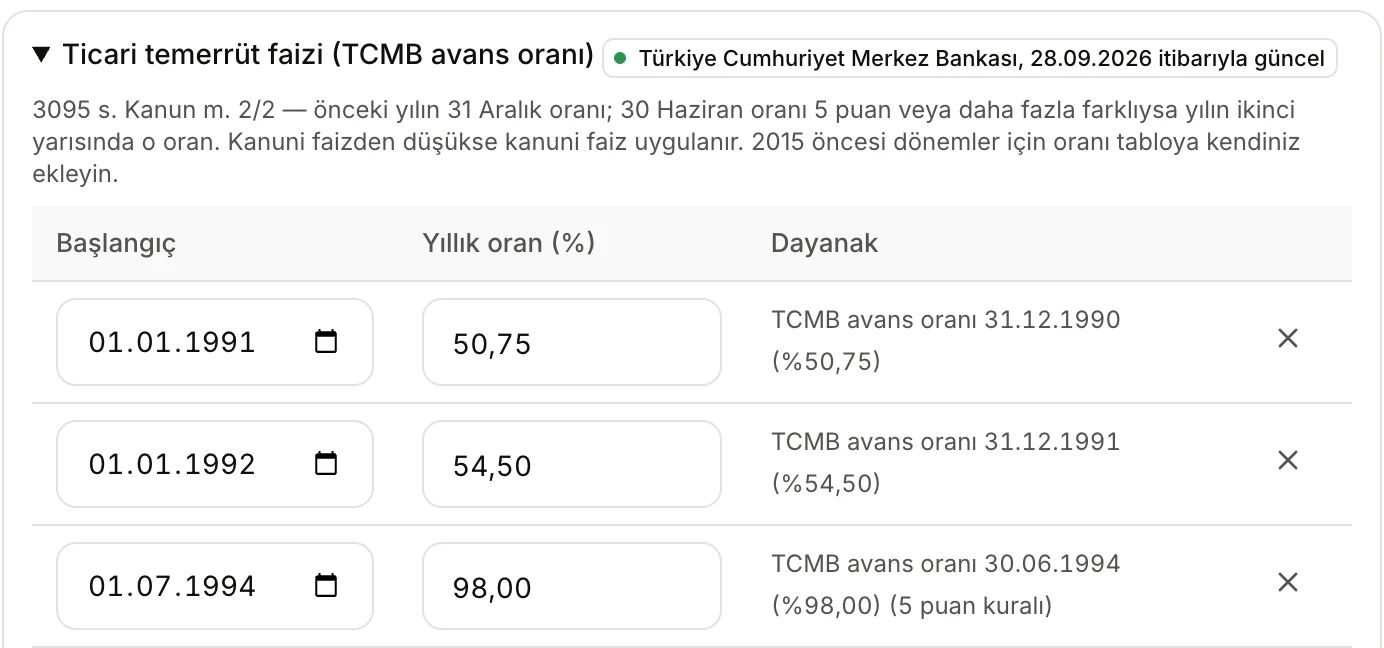
- The table and its source. A green label means the rates come from Vesika's current data, and shows the date they are current as of.
- A note on the rule the table follows.
- Each row is a rate period: Başlangıç (Start), rate and Dayanak (Basis).
Where the rates come from:
- TCMB advance rate: Vesika reads TCMB's rediscount and advance interest rate page every day. The label shows the source and the date of the last read, for example Türkiye Cumhuriyet Merkez Bankası, 28.09.2026 itibarıyla güncel (current as of 28.09.2026).
- Statutory interest: periods up to 31.07.2026 come from the statutory interest table your organisation's administrator keeps up to date. Later periods are calculated as 80% of the TCMB rediscount rate. If the administrator has changed the table, the label also shows the date of the change.
- Late-payment surcharge: the table that ships with the tool. The label says Uygulama içi tablo (doğrulayın) (built-in table, verify). The rate can change by presidential decree at any time; check the current rate before relying on the result.
- Contractual / custom rate: the rate you enter. The label says Kullanıcı girişi (user input).
The label colour shows the source: green is Vesika's current data, orange a table you edited, outlined grey the table that ships with the tool. If current rates cannot be fetched, the card says Güncel oranlar platformdan alınamadı; modülle gelen tablolar kullanılıyor. (Current rates could not be fetched; using the built-in tables.) If TCMB data has not been read for a few days, the warning gives the date of the last check.
Editing the table
You can change a rate or a start date in the table, add a row with Oran dönemi ekle (Add rate period) and remove a row with ×. An edited table's label becomes Düzenlediğiniz tablo (Your edited table), and the result's Oran kaynağı line says Kullanıcının düzenlediği tablo. Click Kaynaktaki tabloya dön (Back to the source table) to discard your edits and go back to the current source.
Rates are percentages (39,75 or %39,75). Rates in the late-payment surcharge table are monthly.
Saving, copying and downloading
The buttons under the result:
- Kaydet (Save): saves the calculation to your account. It appears in Kayıtlı hesaplar (Saved calculations) at the bottom of the page and in History. While a saved calculation is open, the button reads Güncelle (Update) and overwrites that record.
- Metni kopyala (Copy text): copies the whole calculation to the clipboard as plain text.
- Önizle (Preview): opens the calculation as a PDF document in the side panel.
- PDF / Word: downloads the calculation as a PDF or Word document.
- Yeni hesap (New calculation): clears the form and any rate tables you edited.
A copy of every previewed or downloaded document is also kept in Files. The document and the copied text contain, in order: the inputs (interest type, calculation period, offsetting order, method), the periods and events, the totals, any warnings, the rate sources and a note that the rates should be verified against official sources.
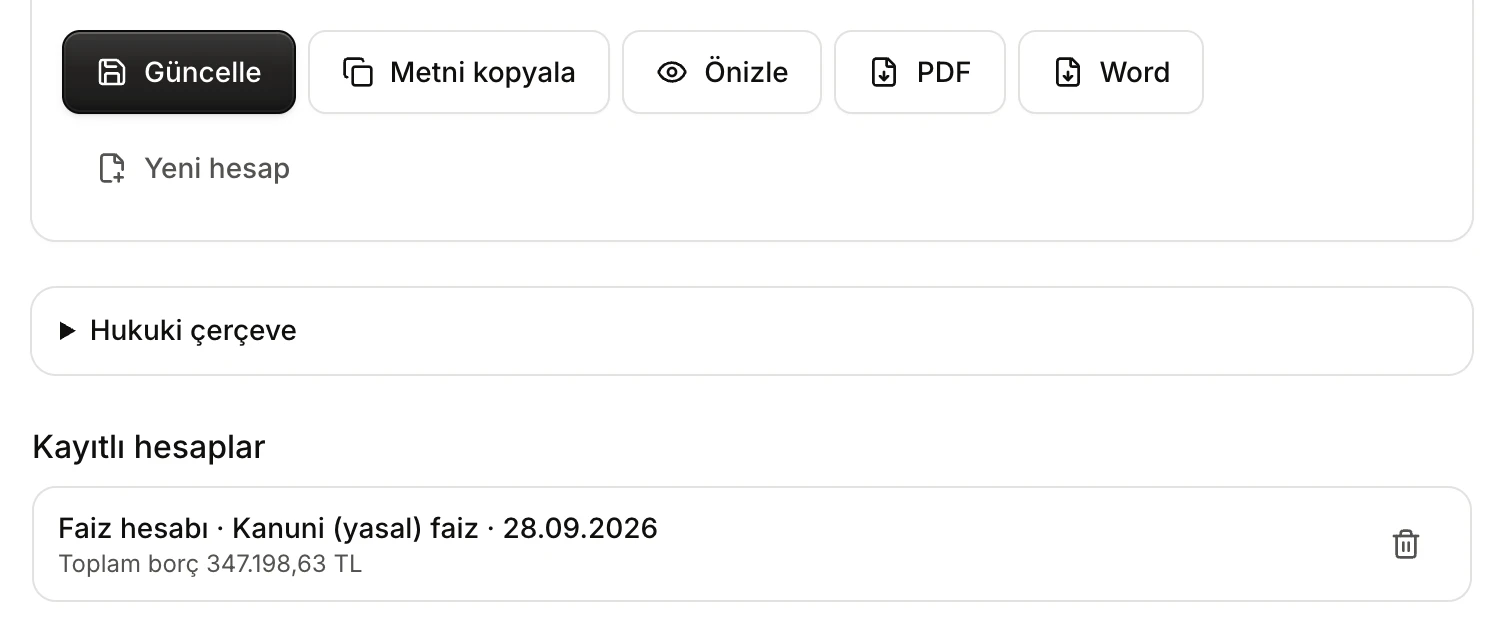
- While a saved calculation is open, Kaydet becomes Güncelle (Update).
- A saved calculation: interest type and end date in the title, total owed below. Click to open it.
- Sil (Delete): removes the calculation from the list and from History.
Opening a saved calculation brings back the form and any rate tables you edited. Tables you did not edit are read again from their current source, so if a new rate has been announced since, the same calculation can give a different result. Kayıtlı hesaplar shows your 30 most recent calculations.
Legal framework
Click Hukuki çerçeve (Legal framework) at the bottom of the page for a short summary of statutory interest (Law 3095 art. 1), commercial default interest (art. 2/2), the late-payment surcharge (Law 6183 art. 51) and offsetting of partial payments (TBK art. 100).
Limits and what to check
- Interest is simple; interest on interest (compound interest) is not calculated.
- For the late-payment surcharge, fractions of a month are calculated as "monthly rate / 30 × days". A calculation by calendar months can differ slightly.
- The statutory interest table starts on 01.01.2006. The built-in fallback advance-rate table starts in 2015. For an older period that the table lacks, add the rate yourself.
- Check the rates against official sources (Official Gazette, TCMB, the Revenue Administration) before relying on the result. Look at the date on the rate source label and at any warnings.
- The result depends on the dates and amounts you enter. Whether the default date, the interest type and the offsetting order fit the case is for you to judge.
- Only you can see your saved calculations.