Petition drafting
Dilekçe Hazırlama (Petition drafting) prepares a petition draft from the facts you describe and the documents you attach. The draft follows the petition template your firm uploaded to Firm templates, or, without one, the standard layout used in Turkish practice. If you wish, verbatim quotations from decisions and statutory articles in Vesika's legal database are added. The result is always a draft you need to review.
Workspace → Evrak Üretimi (Document drafting) → Dilekçe Hazırlama
Step by step
- In the workspace, open Dilekçe Hazırlama under Evrak Üretimi.
- In the Biçim (Format) list at the top, choose your firm's template or Vesika standart biçimi (Vesika standard format).
- Choose the Dilekçe türü (Petition type) and fill in the fields you know (court, parties, value of the claim, requests).
- Write the facts, with dates and amounts, in the Olayı anlatın (Describe the facts) box.
- Add any documents, such as a contract, formal notice or correspondence, in the Belgeler (Documents) area.
- Decide whether you want case-law and legislation quotations, then click Taslağı oluştur (Create draft).
- When the draft is ready, review it, complete the [DOLDURULACAK] (to be filled in) places, and check the quotations and citations in the Denetim (Checks) section.
- Download it as PDF, Word or UDF.
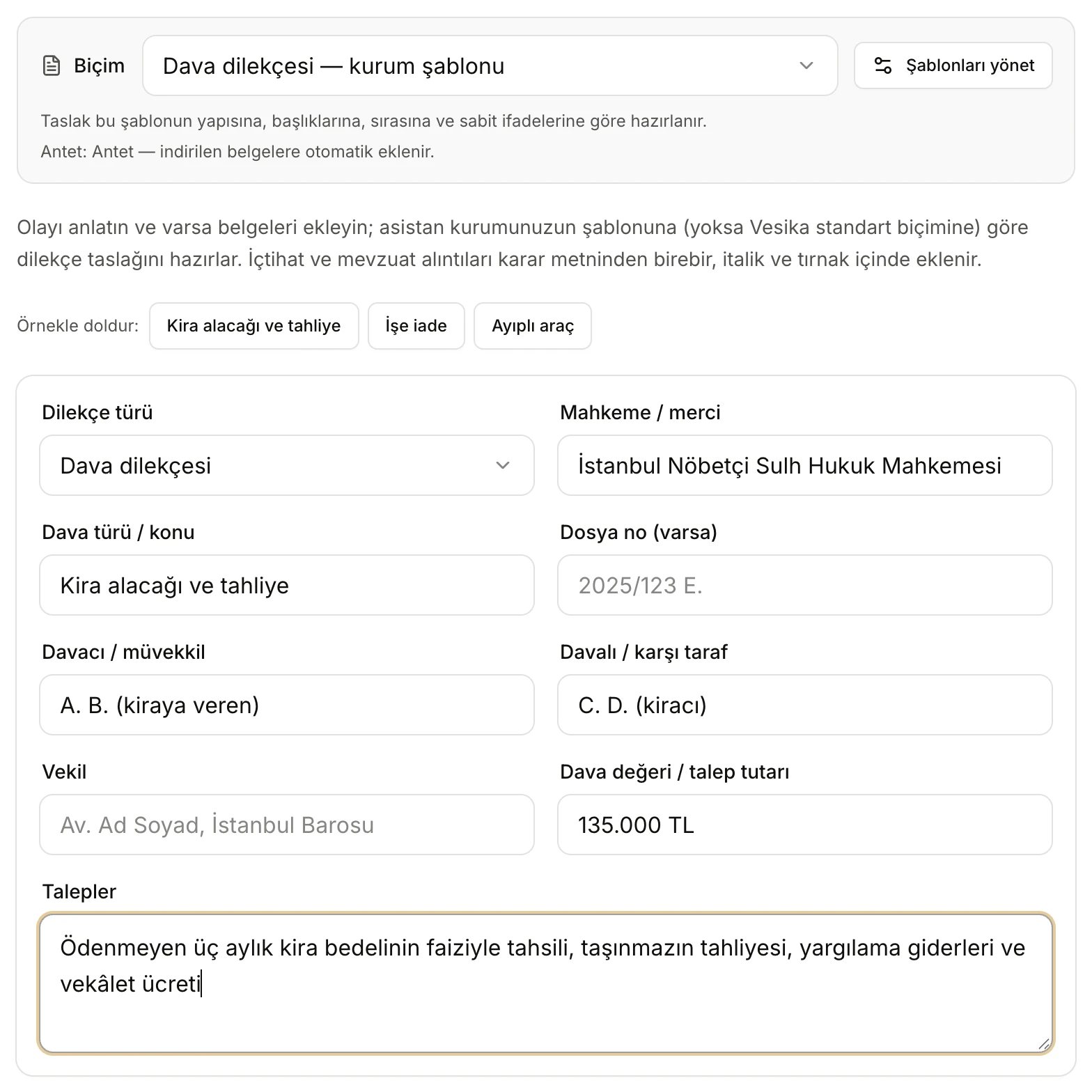
- Biçim (Format): your firm's template or Vesika standart biçimi.
- Şablonları yönet (Manage templates): opens Firm templates.
- If a letterhead is set, it is added to downloaded documents automatically.
- Örnekle doldur (Fill with an example): fills the form with a ready example.
- The petition's details. None is required; leave blank what you do not know.
Format and letterhead
The Biçim (Format) field at the top of the tool stays in the same place on every screen and shows which layout the draft will follow:
- "… — kurum şablonu" (… — firm template): the petition templates your firm uploaded to Firm templates. If there are several, the most recently updated one is selected. When you choose a template, the line below reads "Taslak bu şablonun yapısına, başlıklarına, sırasına ve sabit ifadelerine göre hazırlanır." (The draft follows this template's structure, headings, order and fixed wording.)
- Vesika standart biçimi: the petition layout of Turkish practice (see Structure of the draft below). If there is no petition template at all, this format is used and a note appears under the field.
The second line under the format field shows the letterhead: "Antet: … — indirilen belgelere otomatik eklenir." (Letterhead: … — added to downloaded documents automatically.) or "Kurum anteti tanımlı değil; belgeler antetsiz indirilir." (No firm letterhead is set; documents are downloaded without one.) The Şablonları yönet button opens Firm templates, where templates and the letterhead are uploaded.
While the draft is being created and on the draft screen the format can no longer be changed; the field shows the format the draft was prepared in.
Fill with an example
The Kira alacağı ve tahliye (Unpaid rent and eviction), İşe iade (Reinstatement) and Ayıplı araç (Defective car) buttons fill the form with a ready example case. Use them to see how the tool works. Clicking an example replaces the fields and description you have written so far.
Fields
| Field | What to enter |
|---|---|
| Dilekçe türü (Petition type) | Chosen from a list: Dava dilekçesi (statement of claim), Cevap dilekçesi (statement of defence), Cevaba cevap (replik) dilekçesi (reply), İkinci cevap (düplik) dilekçesi (rejoinder), İstinaf dilekçesi (appeal to the regional court), Temyiz dilekçesi (appeal to the Court of Cassation), Beyan dilekçesi (statement), İcra takibine itiraz dilekçesi (objection to enforcement proceedings), Şikâyet dilekçesi (suç duyurusu) (criminal complaint), İhtiyati tedbir / haciz talebi (interim injunction / attachment request), Diğer (other). |
| Mahkeme / merci (Court / authority) | The court or authority the petition goes to. If left blank, the competent court is inferred from the facts; if the city is unknown, [DOLDURULACAK] is written. |
| Dava türü / konu (Type of case / subject) | A short subject, e.g. "Kira alacağı ve tahliye". The draft's name is also built from it. |
| Dosya no (varsa) (File no., if any) | The docket number for petitions filed in an ongoing case. |
| Davacı / müvekkil (Claimant / client) and Davalı / karşı taraf (Defendant / other party) | Name or trade name, ID or tax number, and address. |
| Vekil (Counsel) | The lawyer's name and bar. If blank, the counsel line is left out of the draft or remains [DOLDURULACAK]. |
| Dava değeri / talep tutarı (Value of the claim) | The amount, for claims with a set value. |
| Talepler (Requests) | What is asked of the court; reflected in the conclusion and requests section. |
The petition type sets the draft's layout: for example, a statement of defence has procedural and substantive objections, appeals state the notification date and the grounds of appeal, and a criminal complaint is headed to the Chief Public Prosecutor's Office.
Describe the facts
Write the facts in your own words, in chronological order: what happened, when, who the parties are, which documents you have, what the client wants. State dates and amounts clearly.
The tool does not ask you questions. The draft rests only on what you write and the documents you attach; no fact, witness or evidence is added. Every unknown detail (name, ID number, address, date, amount, IBAN, bar registration number, the final mediation report, the notification date and so on) is marked in the draft as [DOLDURULACAK] or [DOLDURULACAK: what is needed].
The Taslağı oluştur button becomes active once you have described the facts in at least a few words, entered enough in the fields, or added at least one document.
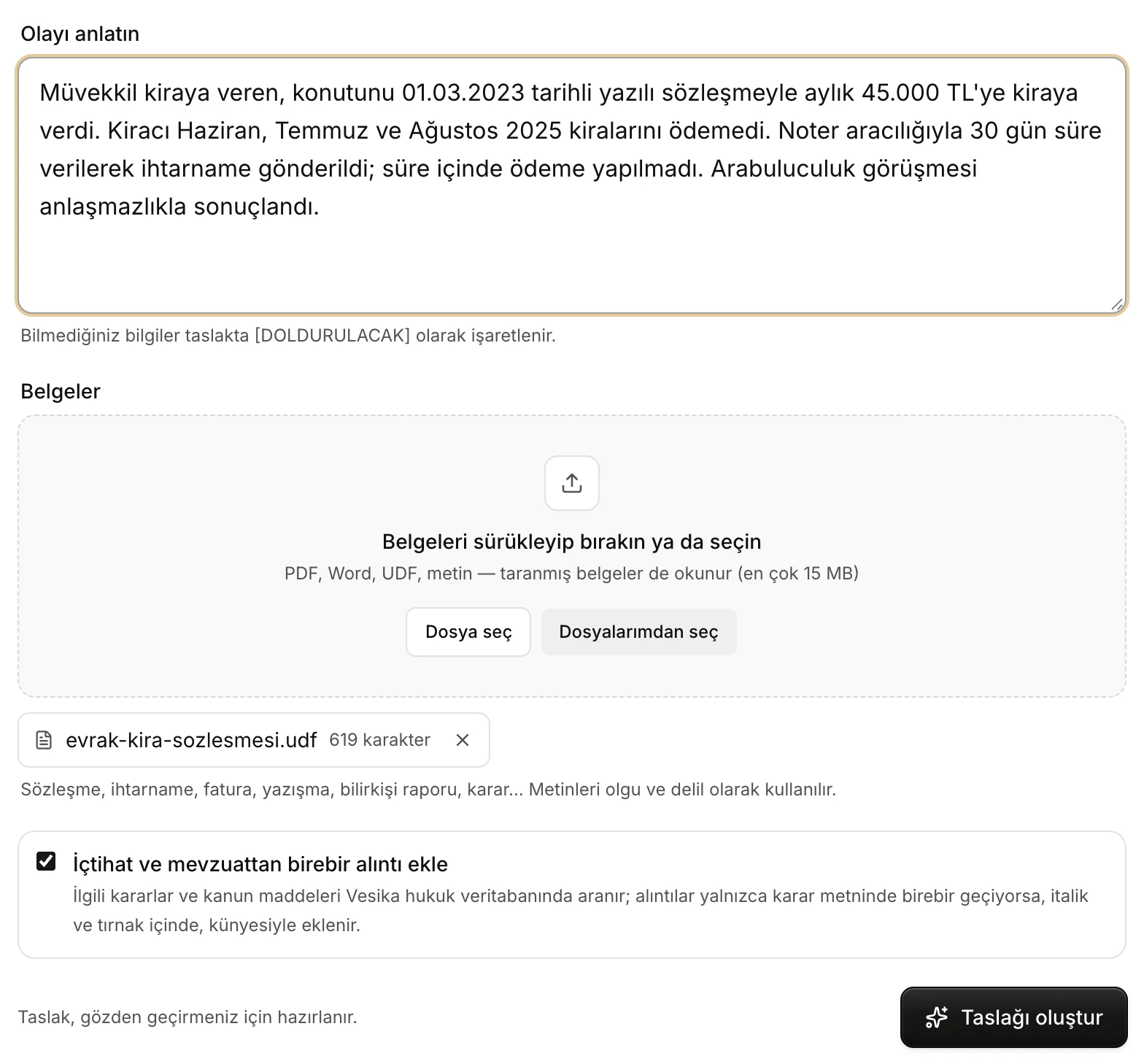
- Olayı anlatın (Describe the facts): dates, amounts, what is requested.
- Belgeler (Documents): drag and drop, Dosya seç (Choose file) or Dosyalarımdan seç (Choose from my files).
- An attached document. Click its name to open it in the side panel; the cross removes it.
- İçtihat ve mevzuattan birebir alıntı ekle (Add verbatim case-law and legislation quotations): on by default for petitions.
- Taslağı oluştur (Create draft).
Documents
Attach the documents of the case: contract, formal notice, invoice, correspondence, expert report, decision. Their text is used as facts and evidence: dates, amounts, clauses and party details are taken from them, shown next to the allegations as "(Ek-1)" (Annex 1), and the documents are listed in the EKLER (Annexes) section.
- File types: PDF, Word (.docx, .doc), UDF, RTF and plain text (.txt). Scanned documents are read as well.
- Size: at most 15 MB per file. A larger file is not added and shows "15 MB sınırını aşıyor" (exceeds the 15 MB limit).
- How to add: drag and drop onto the area, choose from your computer with Dosya seç, or take a file you already uploaded to Vesika from Files with Dosyalarımdan seç. You can add several documents.
- While a document is being read, "okunuyor…" (reading…) appears beside it; once read, its page or character count is shown. Meanwhile Taslağı oluştur waits. A document that cannot be read is shown with a red border and the reason, and is not used in the draft.
- The documents you upload are kept in your Files; click a name to open it in the side panel.
For very long documents only the beginning of each one (about 30,000 characters) and about 90,000 characters in total are taken into account. Attaching just the relevant part of a long file gives better results.
Verbatim case-law and legislation quotations
The İçtihat ve mevzuattan birebir alıntı ekle option is on by default in Petition drafting. When it is on, before writing the draft the tool:
- Searches Vesika's legal database for decisions and statutory articles relevant to your case (at most five sources).
- Retrieves the full text of these sources; for statutes, only the relevant articles.
- Picks passages that support the petition and checks that each one appears word for word in the source text. Passages that do not are not used.
In the draft, quotations stand in their own paragraph, in italics and quotation marks, with the source's citation below. The draft cites only the decisions found in this step; no decision number outside that list is written. Statutory articles may be referred to by name (e.g. "6098 sayılı TBK m. 315", Turkish Code of Obligations art. 315).
If you turn the option off, the draft is prepared without quotations and cites no court decision. If the legal database is unavailable the option is disabled and a note says the draft will be prepared without quotations. If no relevant source is found, or the source texts cannot be retrieved, the draft is still prepared and the Denetim section notes it.
Creating the draft
When you click Taslağı oluştur, the steps and their progress appear. With the quotation option on there are four steps; with it off, only Taslak yazılıyor (Writing the draft).
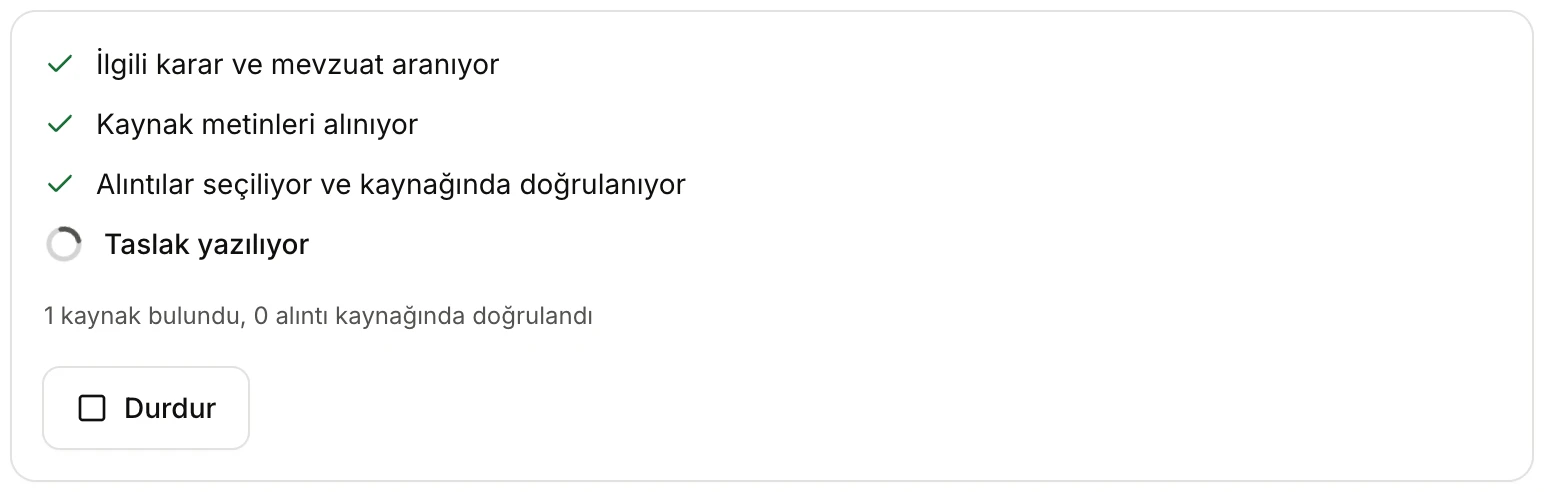
- İlgili karar ve mevzuat aranıyor (Searching relevant decisions and legislation), Kaynak metinleri alınıyor (Retrieving source texts), Alıntılar seçiliyor ve kaynağında doğrulanıyor (Choosing quotations and verifying them in the source), Taslak yazılıyor (Writing the draft). Completed steps are ticked.
- How many sources were found and how many quotations were verified in their source.
- Durdur (Stop): cancels; you return to the form with your entries kept.
While the draft is being written, its text starts to appear in the document view below the steps. When it finishes, the draft opens by itself. If something goes wrong, an error message appears under the form and the button becomes Tekrar dene (Try again).
The draft screen
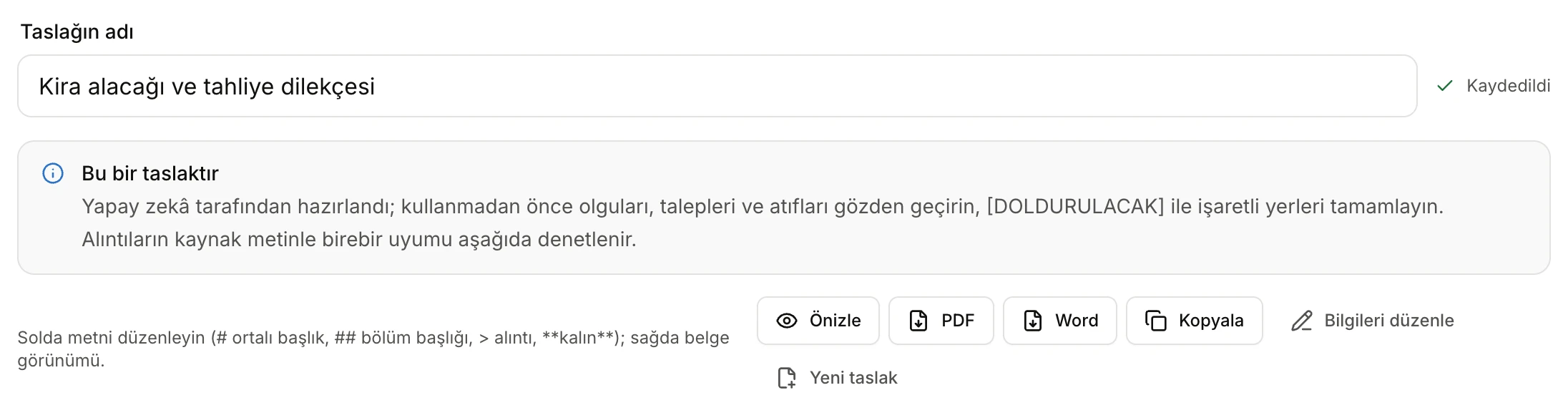
- Taslağın adı (Draft name): also used as the file name; you can change it (up to 80 characters).
- Save status: Kaydedildi (Saved), Kaydediliyor… (Saving…), Kaydedilmemiş değişiklikler (Unsaved changes) or Kaydedilemedi (Could not save).
- A notice that the draft was prepared by AI and must be reviewed.
- Önizle (Preview): opens the draft, with its letterhead, as a PDF in the side panel.
- Downloads as PDF and Word (UDF also appears when available).
- Kopyala (Copy): copies the text to the clipboard.
- Bilgileri düzenle (Edit details): back to the form with your fields and description.
- Yeni taslak (New draft): starts over with an empty form.
The draft screen has two parts: on the left the text you can edit, on the right how the document will look when downloaded (Times New Roman, centred bold headings, justified paragraphs). On narrow screens you switch between them with the Önizleme (Preview) and Düzenle (Edit) tabs.
Editing the text
The text on the left uses a few simple marks, which the screen also reminds you of:
| You write | In the document |
|---|---|
# İSTANBUL 3. ASLİYE HUKUK MAHKEMESİ'NE | A centred, bold line (court, document title) |
## AÇIKLAMALAR | A bold section heading |
> … | A quotation: italic, indented, in quotation marks |
**bold**, *italic* | Inline emphasis |
| An empty line | A paragraph break |
[DOLDURULACAK] marks are highlighted in the preview. Every change is saved automatically shortly after you stop typing.
Structure of the draft
In Vesika standart biçimi a statement of claim is written in this order (HMK art. 119, Code of Civil Procedure):
- The court heading ("[İL] NÖBETÇİ … MAHKEMESİ'NE", to the duty court of the city, when the court is not known); DOSYA NO (file no.) for an ongoing case.
- The DAVACI (claimant), VEKİLİ (counsel), DAVALI (defendant), DAVA DEĞERİ (value of the claim) and KONU (subject) lines.
- AÇIKLAMALAR (Explanations): the facts in chronological, numbered paragraphs, each allegation with the annex it relies on. The final mediation report is stated where required.
- HUKUKİ SEBEPLER (Legal grounds): the relevant laws and articles.
- HUKUKİ DELİLLER (Evidence): documents with their annex numbers, witnesses, expert, inspection, oath and all other lawful evidence.
- SONUÇ VE İSTEM (Conclusion and requests): numbered requests, the last being court costs and attorney's fees.
- Date and signature block, followed by the EKLER (Annexes) list.
For other petition types the layout is adapted: a statement of defence has USULE İLİŞKİN İTİRAZLAR (procedural objections) and ESASA İLİŞKİN CEVAPLARIMIZ (answers on the merits); appeals have İSTİNAF SEBEPLERİ or TEMYİZ SEBEPLERİ (grounds of appeal); an objection to enforcement is headed to the enforcement office; a criminal complaint is headed to the Chief Public Prosecutor's Office with MÜŞTEKİ (complainant), ŞÜPHELİ (suspect) and SUÇ (offence) lines. If you chose a firm template, the draft follows your template's layout instead.
Checks
The Denetim (Checks) section at the bottom of the draft screen is recalculated as you edit:
- Missing details: how many [DOLDURULACAK] marks are left. Sonrakine git (Go to next) selects the next one in the editor. When all are done it reads "İşaretli eksik bilgi kalmadı" (No marked missing details left).
- Alıntılar (Quotations): each quotation in the draft and its status:
- Kaynağında birebir (Verbatim in source): the quotation appears word for word in the source's text. The source's citation is shown beside it as a link.
- Kaynakta bulunamadı (Not found in source): you changed the quotation or added text the source does not contain. It is also marked in red in the preview, and a "… alıntı kaynağında doğrulanamadı" (… quotations could not be verified in their source) warning appears at the top. Correct or remove it.
- Denetlenemedi (Could not be checked) / Kaynak metni yüklenmedi (Source text not loaded): the source's text could not be retrieved for comparison at the moment.
- When the AI writes or proposes a quotation that is not verbatim in a source, it is kept out of the draft; the section says how many, and the place is marked [DOLDURULACAK].
- Kontrol edilecek atıflar (Citations to check): decision numbers in the text that are not among the sources retrieved from Vesika (for example a citation you typed in later). Verify or remove them.
- Kaynaklar (Sources): the decisions and statutes used for the draft, numbered and linked. Below them Kullanılan belgeler (Documents used) are listed; click a name to open it in the side panel.
Checking quotations
"Kaynağında birebir" shows that the quotation's text matches the source; it does not show that the decision fits your case. For each quotation:
- Open the decision in the document reader from the Kaynaklar list or the citation beside the quotation.
- Read which part of the decision the passage comes from (the court's own reasoning, or a view it reports) and what the decision concluded.
- Compare the citation (chamber, docket and decision numbers, date) with the decision.
Do not leave in the petition a quotation or citation you could not check.
Downloading
- Önizle (Preview): opens the draft as a PDF in the side panel.
- PDF and Word: download the file to your computer.
- UDF: the format uploaded to UYAP. This button appears only when UDF conversion is available.
- Kopyala (Copy): copies the text, with its marks (#, ##, >), to the clipboard.
Downloaded documents are A4, Times New Roman 12 pt; if you have a letterhead in Firm templates, its image goes at the top of the first page, the footer at the bottom of each page, and pages are numbered. No Vesika mark is added. Documents you download or preview are also kept in your Files.
Saved drafts
Every draft is saved the moment it is created:
- The Son taslaklar (Recent drafts) list under the form shows the last six drafts you prepared in this tool; click one to open its draft screen.
- Drafts are also listed in the History panel.
- The draft is also a document in Files, updated as you edit. From the file's source you can return to the draft.

- A saved draft and the date of its last change. Click to open it.
Bilgileri düzenle takes you back to the form with the draft's fields and description filled in; if you change them and create again, a new draft is prepared and the old one stays saved. When you open a saved draft later, the documents you attached are not brought back to the form; add them again before creating a new draft.
Limits and things to check
- The draft is written by AI and may be wrong or incomplete. Check the facts, requests, time limits, jurisdiction and venue, citations and quotations before using it.
- The tool does not ask questions; it marks missing details with [DOLDURULACAK]. Complete all of them before filing.
- Quotations are checked only for word-for-word agreement with the source text; you must judge whether the decision fits your case.
- Documents: at most 15 MB per file; only the first part of very long documents is used.
- If you have reached your AI usage limit, the form shows a "Yapay zekâ kullanılamıyor" (AI unavailable) warning and no draft can be created. See Plans and limits.
- Only the text of a firm template is used; the fonts and page layout of your Word file are not carried over.