Contract drafting
Sözleşme Hazırlama (Contract drafting) prepares drafts of contracts such as services, lease, confidentiality or sale agreements. You enter the type of contract, the parties and the commercial terms, and attach any offer, old contract or correspondence; the draft follows the contract template in your firm's Firm templates, or the standard contract layout of Turkish practice if there is none. The result is a draft you need to review before sending it to the parties.
Workspace → Evrak Üretimi (Document drafting) → Sözleşme Hazırlama
Step by step
- In the workspace, open Sözleşme Hazırlama under Evrak Üretimi.
- In the Biçim (Format) list at the top, choose your firm's contract template or Vesika standart biçimi (Vesika standard format).
- Type the Sözleşme türü (Contract type) or choose it from the list, and set Kimin lehine (In whose favour).
- Enter the parties, subject, price, term, place of jurisdiction and special terms.
- In the Anlaşmayı anlatın (Describe the agreement) box, write what the parties agreed and which terms matter to the client.
- Add documents such as the offer, an old contract or the other side's draft in the Belgeler (Documents) area.
- Click Taslağı oluştur (Create draft); review the draft and complete the [DOLDURULACAK] (to be filled in) places.
- Download it as Word, PDF or UDF.
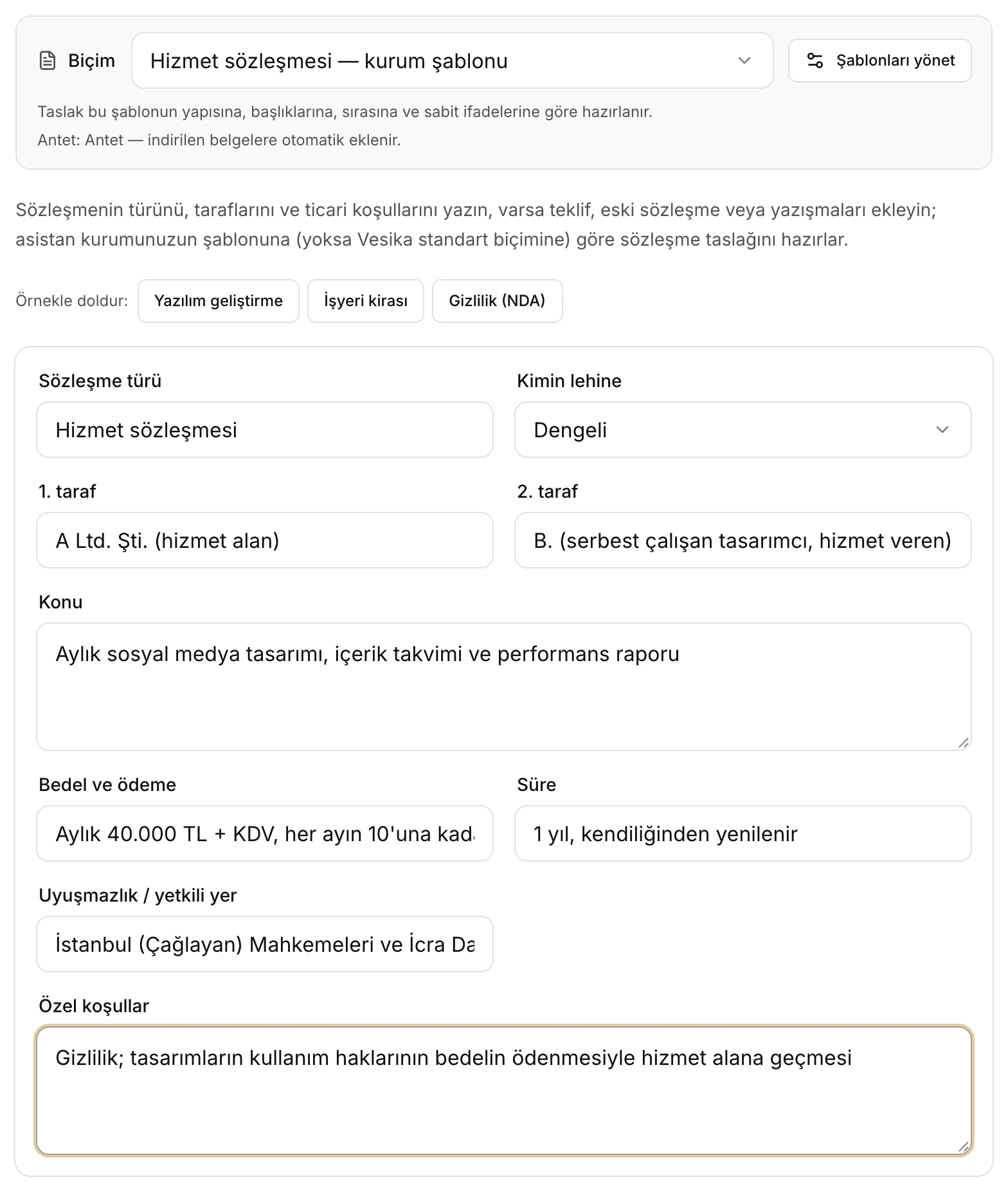
- Biçim (Format): your firm's contract template or Vesika standart biçimi.
- If a letterhead is set, it is added to the downloaded contract automatically.
- Örnekle doldur (Fill with an example): Yazılım geliştirme (Software development), İşyeri kirası (Business lease), Gizlilik (NDA) (Confidentiality).
- The contract's details; none is required.
- Kimin lehine (In whose favour): the balance of the clauses.
Format and letterhead
In the Biçim field at the top, the contract templates your firm uploaded to Firm templates are listed as "… — kurum şablonu" (… — firm template); the most recently updated one is selected. If you choose Vesika standart biçimi, or there is no contract template, the draft follows the standard layout below. You can upload separate templates for different kinds of contract (for example services and lease) and choose the right one for each draft. The letterhead status is shown under the field; Şablonları yönet (Manage templates) opens Firm templates. Details: Petition drafting → Format and letterhead.
Fields
| Field | What to enter |
|---|---|
| Sözleşme türü (Contract type) | Type it or choose from the suggestions: Hizmet sözleşmesi (services), Danışmanlık sözleşmesi (consultancy), Gizlilik sözleşmesi (NDA), İşyeri kira sözleşmesi (business lease), Konut kira sözleşmesi (residential lease), Satış sözleşmesi (sale), Tedarik sözleşmesi (supply), Distribütörlük sözleşmesi (distribution), Yazılım geliştirme (eser) sözleşmesi (software development), Lisans sözleşmesi (licence), Hisse devir sözleşmesi (share transfer), Belirsiz süreli iş sözleşmesi (indefinite-term employment). The draft's name is also built from it. |
| Kimin lehine (In whose favour) | Dengeli (Balanced), 1. taraf lehine (In favour of party 1) or 2. taraf lehine (In favour of party 2). When a party is chosen, the clauses are built in that party's favour, but in a valid and defensible way; with Dengeli the obligations are written mutually and equally. |
| 1. taraf and 2. taraf (Party 1 and Party 2) | Trade name or name, tax or ID number, address. |
| Konu (Subject) | What the contract is about, e.g. the service to be provided. |
| Bedel ve ödeme (Price and payment) | Amount, VAT, due date and method of payment. |
| Süre (Term) | Start, duration, renewal. |
| Uyuşmazlık / yetkili yer (Disputes / jurisdiction) | The competent courts and enforcement offices. |
| Özel koşullar (Special terms) | Penalty clause, non-compete, intellectual property, delivery schedule, warranty, insurance and the like. |
If you do not give commercial terms such as the price, term or parties, the draft does not invent them; [DOLDURULACAK: …] is written in their place.
Describe the agreement and documents
In Anlaşmayı anlatın (Describe the agreement), write what the parties agreed on, who does what and when, how payment works, the main risks for the client and the terms they cannot do without. The tool does not ask you questions; missing details are marked [DOLDURULACAK] in the draft.
In Belgeler (Documents), add the offer, an old contract, the other side's draft or e-mail correspondence; their text is used to work out the terms. PDF, Word, UDF, RTF and text files can be added; scanned documents are read too; the limit is 15 MB per file. For details on adding documents see Petition drafting → Documents.
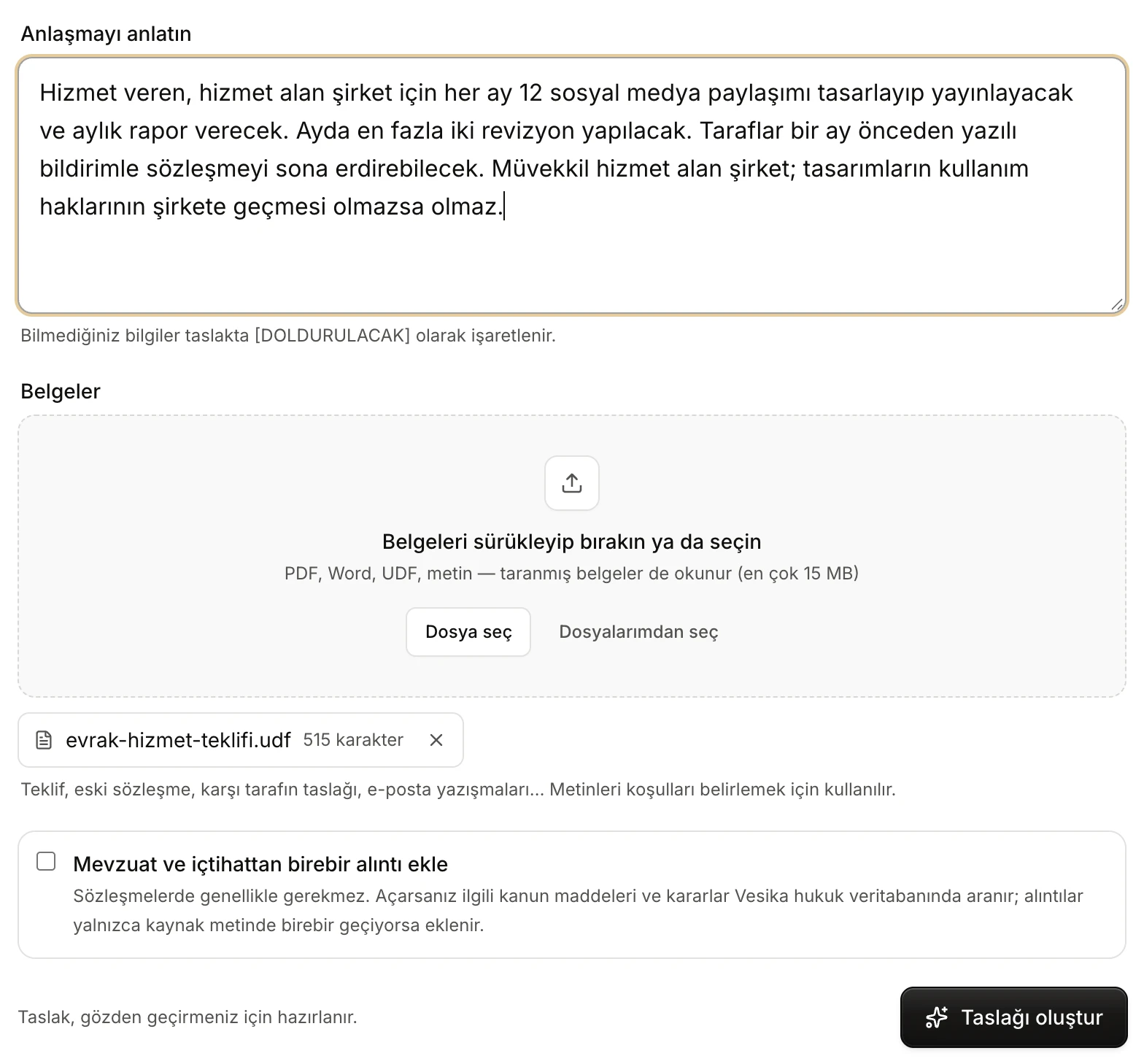
- Anlaşmayı anlatın: who does what, payment, risks, must-haves.
- Belgeler: offer, old contract, the other side's draft.
- An attached document. Click its name to open it in the side panel; the cross removes it.
- Mevzuat ve içtihattan birebir alıntı ekle (Add verbatim legislation and case-law quotations): off by default for contracts.
- Taslağı oluştur (Create draft).
Verbatim legislation and case-law quotations
Contracts rarely need quotations, so this option is off by default. If you turn it on, the relevant statutory articles and decisions are searched in Vesika's legal database and only passages that appear word for word in the source are quoted. How it works in detail: Petition drafting → Verbatim case-law and legislation quotations.
Creating the draft
With the quotation option off there is a single step: Taslak yazılıyor (Writing the draft). If you turn it on, the search, source text and quotation verification steps come first.

- Taslak yazılıyor: the only step when no quotations are requested.
- Durdur (Stop): cancels; you return to the form.
When the draft is ready it opens by itself; if something goes wrong, the button becomes Tekrar dene (Try again).
The draft screen
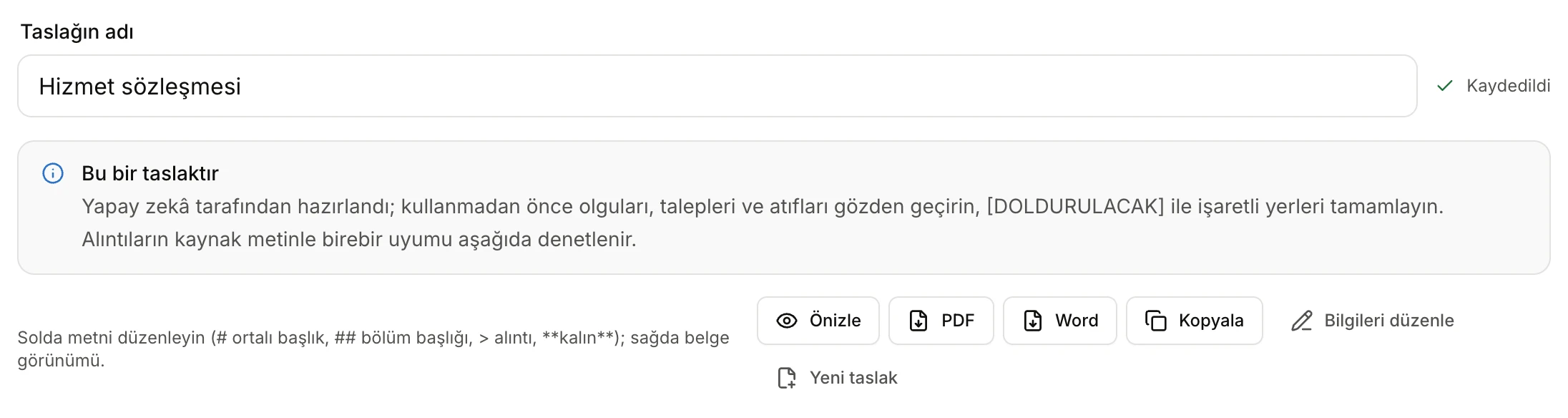
- Taslağın adı (Draft name): becomes the downloaded file's name.
- Changes are saved automatically.
- A reminder to review before use.
- Önizle (Preview): opens the PDF with letterhead in the side panel.
- Downloads as PDF and Word (and UDF when available).
- Kopyala (Copy): copies the text to the clipboard.
- Bilgileri düzenle (Edit details): back to the form.
- Yeni taslak (New draft): starts with an empty form.
You edit the text on the left and watch the document's appearance on the right. The contract title is marked with #, clause headings with ##; [DOLDURULACAK] places are highlighted. The Denetim (Checks) section below shows missing details and, if you asked for quotations, whether they match their source. The whole screen is described in Petition drafting → The draft screen and Checks; it works the same for contracts.
When you add or delete clauses, update the numbering and internal references (such as "Madde 7.2 uyarınca", under clause 7.2) yourself; the editor does not renumber them.
Structure of the draft
In Vesika standart biçimi a contract is written with consecutively numbered clauses in the form "MADDE 1 – TARAFLAR" (Article 1 – Parties) and sub-clauses such as "4.1.", "4.2.". Clauses that do not fit the contract are dropped, needed ones are added and the numbers are put back in order. The basic order:
- The contract's name (e.g. HİZMET SÖZLEŞMESİ, services agreement).
- Taraflar (Parties): trade name, number, address and short names ("Taraflar", "Taraf").
- Tanımlar (Definitions), Sözleşmenin konusu (Subject matter), Tarafların hak ve yükümlülükleri (Rights and obligations of the parties).
- Bedel ve ödeme koşulları (Price and payment terms): amount in figures and words, VAT, due date, place of payment, invoicing, default interest.
- Süre (Term), Sözleşmenin sona ermesi ve fesih (Expiry and termination).
- Gizlilik (Confidentiality); Kişisel verilerin korunması (Protection of personal data) where personal data is processed.
- Mücbir sebep (Force majeure), Devir yasağı (No assignment), Uyuşmazlıkların çözümü ve yetki (Disputes and jurisdiction), Tebligat adresleri (Addresses for notices), Çeşitli hükümler (Miscellaneous).
- Yürürlük (Entry into force): number of clauses, date of signing and number of copies.
- A signature block for each party.
The draft tries to respect some legal limits: a jurisdiction clause is written only between merchants or public legal entities; no clause is written against the mandatory rules protecting consumers or tenants; if a penalty clause is provided, its amount or method of calculation is stated clearly; arbitration or optional mediation clauses are added only if you ask for them. If you chose a firm template, the draft follows your template's clause layout and standard wording instead.
Downloading and saved drafts
- Önizle opens the draft, with its letterhead, as a PDF in the side panel; PDF and Word download it; the UDF button appears when UDF conversion is available. Documents are A4, Times New Roman 12 pt, with letterhead and page numbers. If you will work on the contract with the other side, download the Word file.
- Every draft is saved the moment it is created. The Son taslaklar (Recent drafts) list under the form shows the last six contract drafts; drafts are also in the History panel and in Files.
- If you change the terms with Bilgileri düzenle and create again, a new draft is prepared; the old one stays saved. When you return to the form from a saved draft, you need to add the documents again.
Limits and things to check
- The draft is written by AI. Check the parties, price, periods, termination and penalty clauses, jurisdiction clause and internal references before use.
- The draft does not assess the contract's validity or its tax consequences (for example stamp duty).
- To review a contract sent by the other side, use Contract review rather than this tool; to compare two versions, use Contract comparison.
- Documents can be at most 15 MB per file; only the first part of very long documents is used.
- If you have reached your AI usage limit, no draft can be created: Plans and limits.