Rent increase calculator
Kira Artış Hesabı (Rent increase calculator) works out how far the rent of a residential or roofed commercial lease may legally rise for a renewed lease year. It applies the 12-month CPI (TÜFE) average cap of TBK art. 344 and, for residential leases renewed in the relevant window, the temporary 25% cap. Use it when advising a tenant or landlord on an increase, or when preparing a formal notice or a rent determination (kira tespit) case.
Workspace → Hesaplama (Calculation) → Kira Artış Hesabı
The calculation follows fixed rules applied to the values you enter and the CPI table; no AI is involved. The amount it finds is a ceiling. It does not assess comparable market rents.
Step by step
- In Mevcut aylık kira (TL) (Current monthly rent), enter the monthly rent paid in the lease year that is ending.
- In Kiralananın türü (Type of property), choose Konut (Residential) or Çatılı işyeri (Roofed commercial premises).
- In Yeni kira yılının başlangıcı (Start of the new lease year), enter the first day the increase applies (the renewal date). It opens with the first day of next month.
- Optionally fill in Sözleşmenin başlangıcı (isteğe bağlı) (Start of the lease, optional). The tool uses it to check the five-year rule.
- In Sözleşmedeki artış şartı (Increase clause in the lease), choose what the lease says. If you choose Sabit oran (%) (Fixed rate), type the rate in Sözleşmedeki oran (%) (Rate in the lease).
- In Tabloda gösterilecek yıl sayısı (Number of years to show), choose how many lease years to list (1–5).
- Check the rate in the Uygulanacak TÜFE 12 aylık ortalama değişimi (12-month average CPI change to apply) box. The Sonuç (Result) card updates as you type.
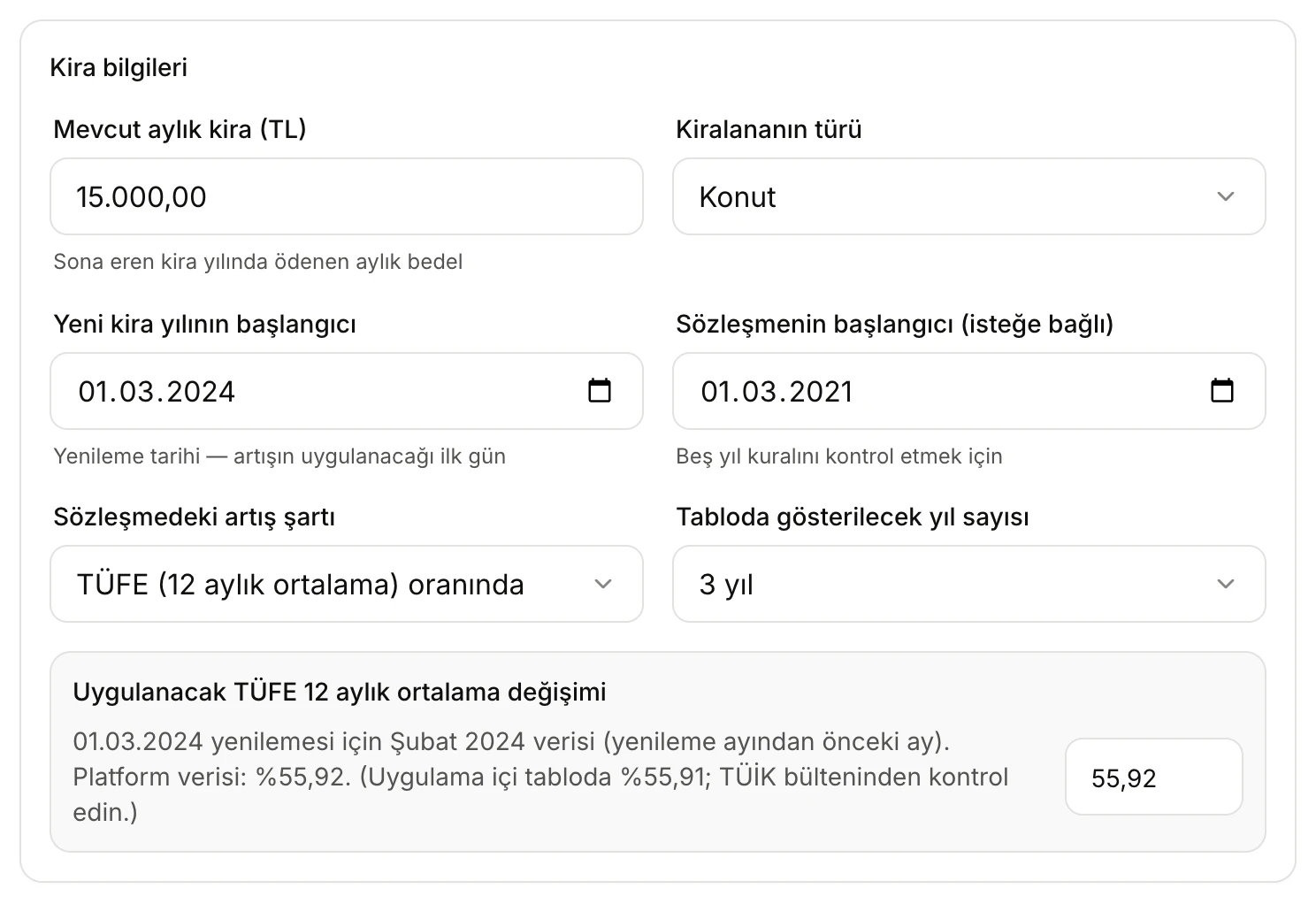
- The monthly rent in the lease year that is ending.
- Konut (Residential) or Çatılı işyeri (Roofed commercial). The temporary 25% cap applies only to residential leases.
- The first day of the new lease year. The CPI month used depends on this date.
- The start of the lease: used only for the five-year rule.
- The increase clause: CPI-linked, a fixed rate, or no clause.
- Which month's CPI figure is used, and its value. You can change the value here.
Write the rent as 12.500,00. An invalid entry shows a red message at the bottom of the card, for example Kira tutarını 12.500,00 biçiminde girin. (Enter the rent as 12.500,00), Sözleşme başlangıcı, yeni kira yılından önce olmalı. (The lease start must be before the new lease year) or Sözleşmedeki artış oranını girin (ör. 25). (Enter the rate in the lease, e.g. 25).
Which CPI figure is used?
For a lease year, the TÜİK figure of the month before the renewal month is used. For a lease year starting on 01.03.2024, the "change by twelve-month averages" of February 2024 applies. The Uygulanacak TÜFE 12 aylık ortalama değişimi box says which month is used and where the value comes from:
- Platform verisi (Platform data): Vesika reads the CPI data TCMB publishes every day and computes the 12-month average change from it. This can differ from the figure TÜİK publishes by up to ±0.01 points.
- Uygulama içi tablo (Built-in table): used when current data cannot be fetched.
If the two sources differ, the box also shows the built-in value, for example (Uygulama içi tabloda %55,91; TÜİK bülteninden kontrol edin.) (55.91% in the built-in table; check the TÜİK bulletin). In that case check the figure in the TÜİK bulletin.
If the month has not been published yet, the box says Bu ay henüz açıklanmamış ya da tabloda yok — oranı girin. (Not published yet or not in the table — enter the rate) and the result shows an Oran gerekli (Rate needed) note. Type the value in the field on the right of the box. A value you changed gets an undo icon next to it; Tablodaki değere dön (Back to the table value) restores the source value.
The increase clause
- TÜFE (12 aylık ortalama) oranında (By the 12-month CPI average): the increase equals the legal ceiling.
- Sabit oran (%) (Fixed rate): if the lease's rate is below the ceiling, that rate applies. If it is above, the excess is void (TBK art. 344/1) and the ceiling applies. A negative rate is treated as zero.
- Artış şartı yok (No increase clause): the rate found is the ceiling the landlord can reach by agreement or through a rent determination case. The judge sets the rent on equitable grounds without exceeding it (TBK art. 344/2).
Below, a residential lease has a fixed 40% increase clause. The renewal is on 01.09.2026, so the August 2026 figure (31.79%) is the ceiling and applies instead of the lease's rate.
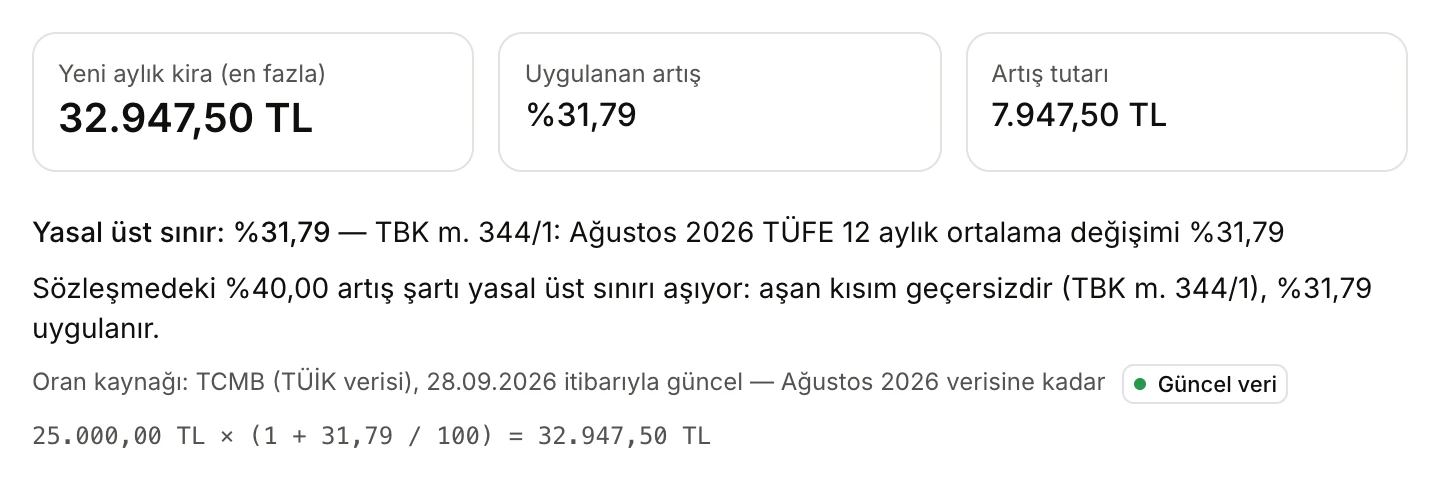
- New monthly rent, the increase rate applied and the increase amount.
- The explanation: the lease's rate exceeds the ceiling, and which rate applies.
The temporary 25% cap
For residential leases, if the renewed lease year started between the dates below (both days included), the increase could not exceed 25%. If the CPI average was below 25%, the CPI applied:
- 11.06.2022 – 01.07.2023: TBK provisional art. 1 (Law 7409 art. 4)
- 02.07.2023 – 01.07.2024: TBK provisional art. 2 (Law 7456 art. 23)
The cap was not extended after 01.07.2024, and it never applied to roofed commercial premises. The tool applies it automatically from the Yeni kira yılının başlangıcı date. When it applies, the legal ceiling line shows an orange %25 sınırı (25% cap) label, and the yearly table shows (%25) next to the rate.
Reading the result
In the example, a residential rent of 15,000.00 TL is renewed on 01.03.2024. The lease started on 01.03.2021 and has a CPI-linked clause. The February 2024 average was 55.92%, but the renewal date falls in the temporary cap window, so the increase is limited to 25%.
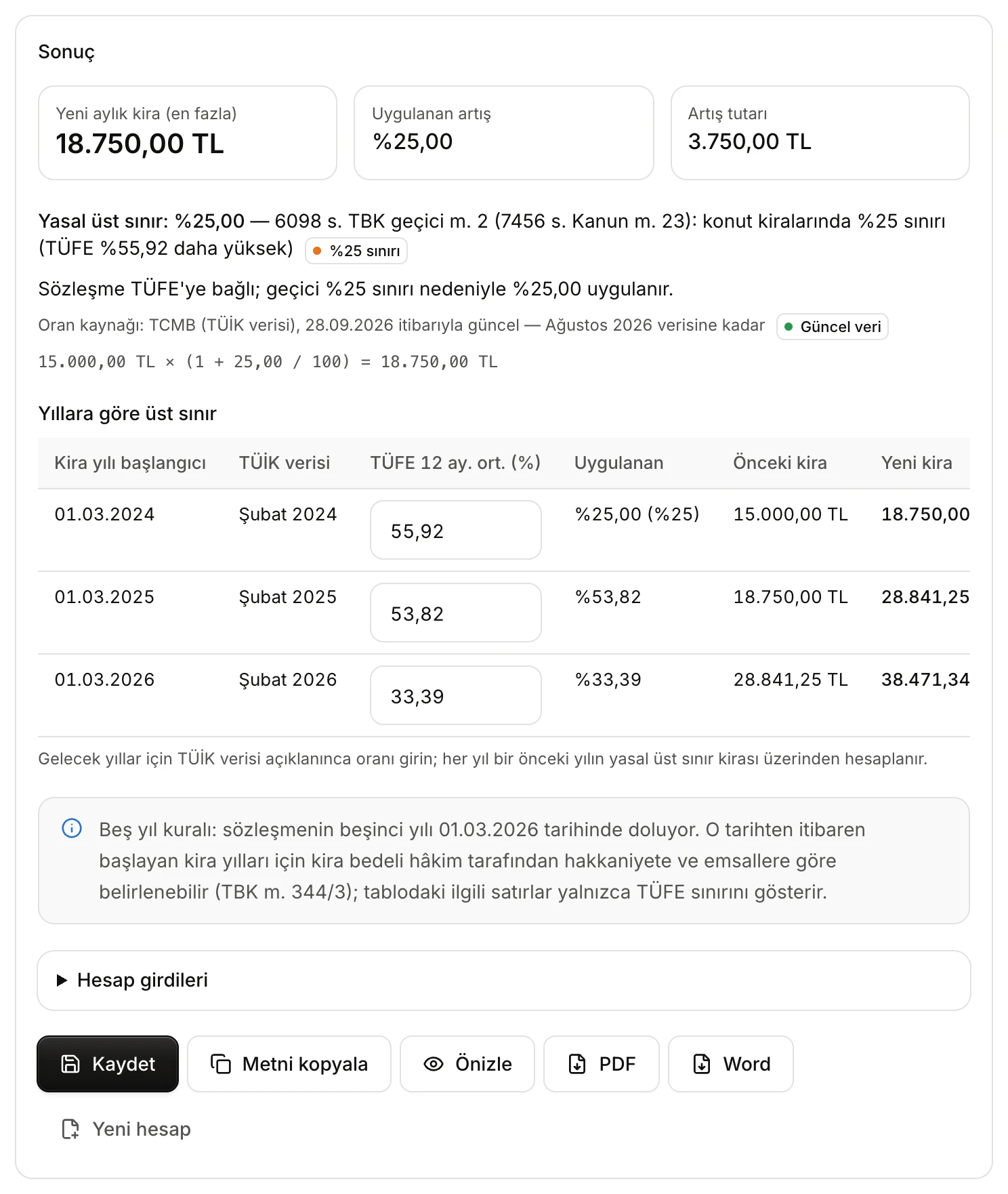
- Yeni aylık kira (en fazla) (New monthly rent, maximum), Uygulanan artış (Increase applied) and Artış tutarı (Increase amount).
- Yasal üst sınır (Legal ceiling) and its basis. Here the temporary 25% cap applied.
- Oran kaynağı (Rate source): where the CPI data comes from, the date it is current as of, and the last month it covers.
- Yıllara göre üst sınır (Ceiling by year): the following lease years, each built on the previous year's result.
- Notes on the calculation; here, the five-year rule.
- Save, copy, preview and download buttons.
The Sonuç card contains:
- Summary boxes: Yeni aylık kira (en fazla), Uygulanan artış and Artış tutarı.
- Yasal üst sınır: the rate and its basis (TBK art. 344/1 and the CPI month, or the temporary 25% cap).
- Explanation of the rate applied: how the lease's clause compares with the ceiling.
- Oran kaynağı: the source of the CPI figure. A green Güncel veri (Current data) label means current data was used. If you typed the value, it says sizin girdiğiniz değer (the value you entered).
- Calculation line: for example
15.000,00 TL × (1 + 25,00 / 100) = 18.750,00 TL. The new rent is rounded to the kuruş. - Yıllara göre üst sınır: as many lease years as you chose. Each row shows the lease year's start, the TÜİK month used, the CPI figure, the rate applied, and the previous and new rent. Each year is calculated on the previous year's legal ceiling rent. You can also change the CPI figures in the table itself. In a year whose figure is not published yet, the table stops and the card asks you to enter that month's value.
- Notes: the five-year rule and older dates (below).
- Hesap girdileri (Calculation inputs): click to open a summary of what you entered.
The five-year rule and older dates
If you entered Sözleşmenin başlangıcı, the tool works out which year of the lease the new lease year is:
- If the renewal comes after the fifth year of the lease has ended, the note says that the judge may set the rent for this lease year on equitable grounds, taking into account CPI, the condition of the property and comparable rents (TBK art. 344/3), and that the ceiling then does not bind the judge.
- If the fifth year ends within one of the years in the table, the note says that the rows from that date on show only the CPI ceiling.
Also:
- For renewals before 18.01.2019, the measure in TBK art. 344 was the producer price index (ÜFE). The tool uses the CPI table; enter the rate yourself for those dates.
- For commercial leases whose tenant is a merchant or a legal person, TBK art. 344 did not apply until 01.07.2020. With Çatılı işyeri selected, renewals before that date show a note about this.
The CPI table
Click TÜFE 12 aylık ortalama tablosu (TÜİK) (12-month average CPI table) at the bottom of the page to see every month's figure since 2018.
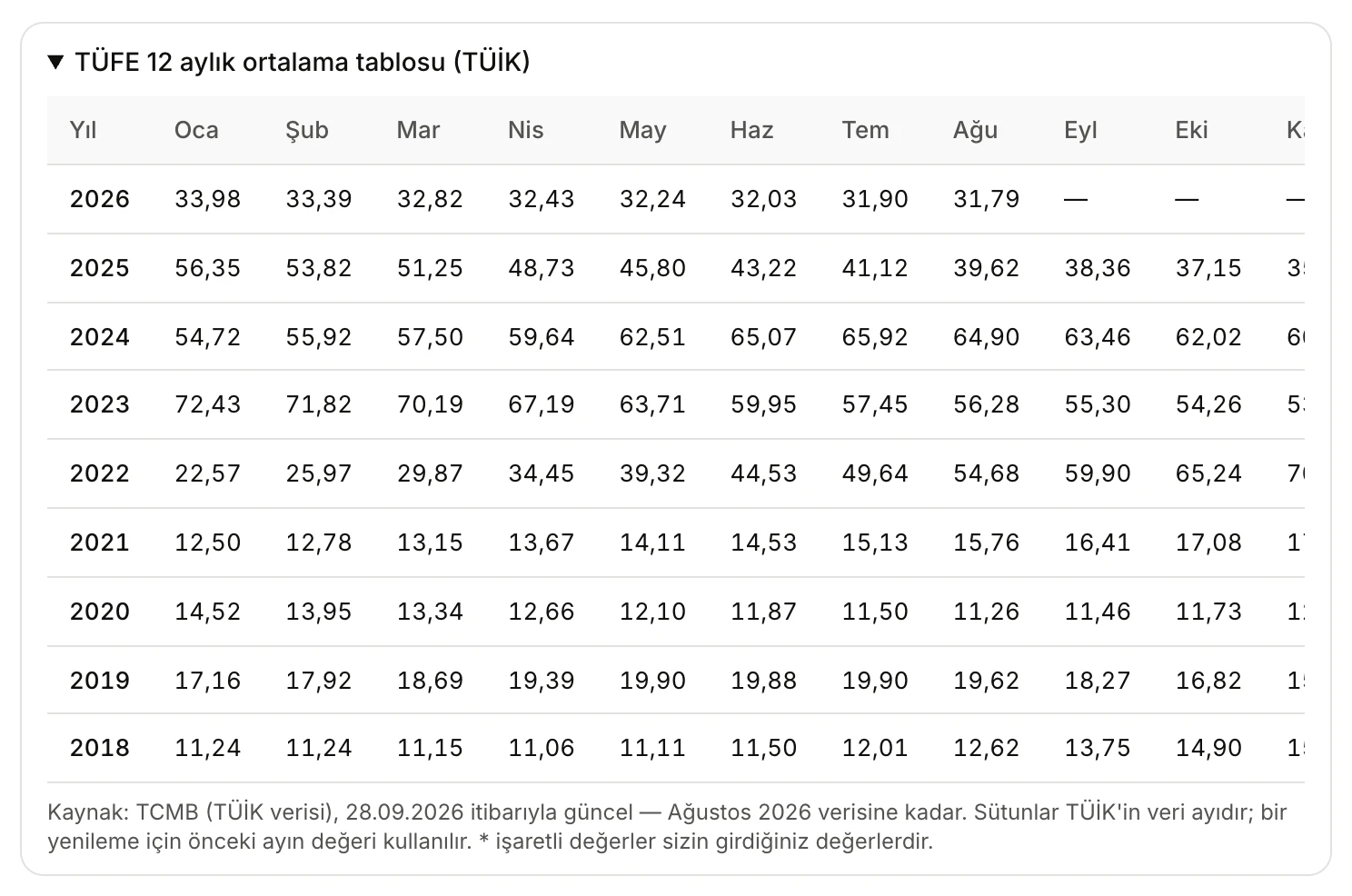
- Rows are years, columns are TÜİK data months. A renewal uses the previous month's figure.
- The table's source, the date it is current as of and the last month covered. Values marked * are ones you entered.
Saving, copying and downloading
- Kaydet (Save): saves the calculation to your account. It appears in Kayıtlı hesaplar (Saved calculations) at the bottom of the page and in History. The title shows the type of property and the renewal date; the line below shows the old and new rent. While a saved calculation is open, the button reads Güncelle (Update).
- Metni kopyala (Copy text): copies the whole calculation to the clipboard as plain text.
- Önizle (Preview): opens the calculation as a PDF document in the side panel.
- PDF / Word: downloads the calculation as a PDF or Word document.
- Yeni hesap (New calculation): clears the form and any CPI values you entered.
The document and the copied text contain the inputs, the result (ceiling, rate applied, increase amount, new rent and the calculation line), the yearly table, the notes and the source. The source section also lists any CPI months you changed. A copy of every previewed or downloaded document is also kept in Files.
Opening a saved calculation brings back the form and the CPI values you entered; other values are read from the current source. Kayıtlı hesaplar shows your 30 most recent calculations. The bin icon (Sil, Delete) removes a calculation from the list and from History.
The Hukuki çerçeve (Legal framework) section at the bottom of the page summarises TBK art. 344/1, 344/2 and 344/3 and the dates of the temporary 25% cap.
Limits and what to check
- The result is the legal ceiling; the parties may agree on a lower increase.
- Comparable market rents are not assessed. After five years, and in a rent determination case, the rent the judge sets may differ.
- Check the CPI figure against the TÜİK bulletin before relying on it; look especially at the date on the Oran kaynağı line and at any note about the two sources differing.
- Enter future lease years' figures once TÜİK publishes them; until then the table stops at that year.
- Only you can see your saved calculations.