Enforcement and wage garnishment tracking
İcra / Maaş Haczi Takibi (Enforcement and wage garnishment tracking) is for following your enforcement files (icra dosyası), especially collection through wage garnishment (maaş haczi). For each file you keep the claim items, the employer and the garnishment order (müzekkere), the monthly deduction and the payments received; the tool computes what remains and an estimated time to finish, and highlights files where the employer has not answered or payments have stopped. The figures come from the amounts you enter; AI is used only in the optional UYAP belgesinden doldur (Fill from a UYAP document) feature.
Workspace → Takip (Tracking) → İcra / Maaş Haczi Takibi
Step by step
- In the workspace, open İcra / Maaş Haczi Takibi under Takip.
- Click Yeni dosya (New file) at the top right. The Yeni icra dosyası (New enforcement file) form opens on the right.
- Fill in the Dosya (File), Taraflar (Parties) and Alacak kalemleri (Claim items) sections. You must enter at least the file number or the debtor's name.
- In İşveren ve maaş haczi (Employer and wage garnishment), enter the employer, the date of the garnishment order, the employer's answer and the debtor's net salary; the monthly deduction is computed at once.
- Optionally add a Sonraki kontrol tarihi (Next check date) and a note in the Takip (Follow-up) section.
- Click Dosyayı ekle (Add file). The file's page opens; add each payment from the employer under Tahsilatlar (Collections).
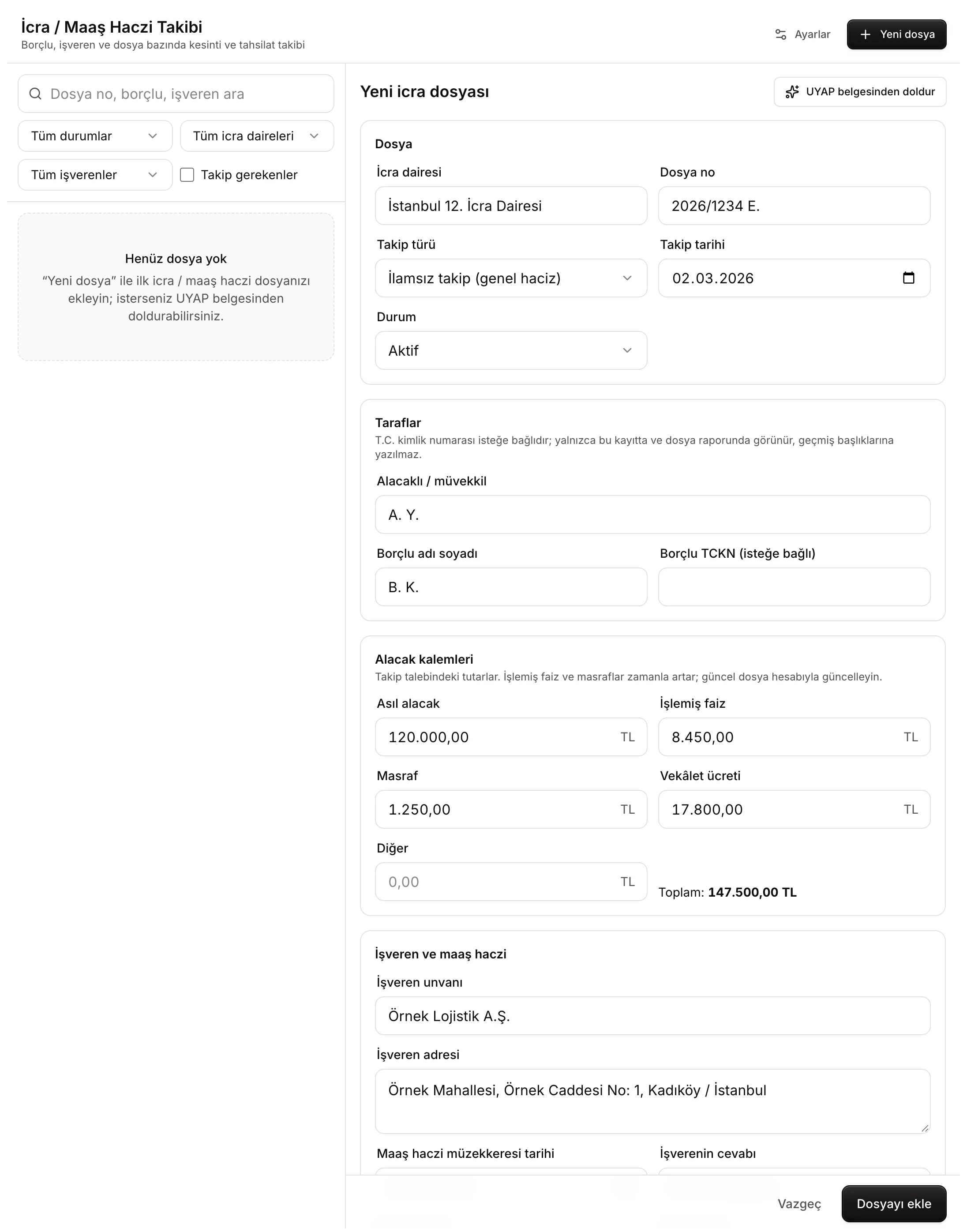
- UYAP belgesinden doldur (Fill from a UYAP document) suggests fields from a document (optional).
- Dosya (File): enforcement office, file number, type of proceedings, date and status.
- Taraflar (Parties): creditor / client, debtor and the optional Turkish ID number.
- Alacak kalemleri (Claim items): the amounts and the Toplam (Total), updated as you type.
The saved file is listed in the Geçmiş (History) panel with its file number and the debtor's name; the ID number is never written into the history title.
File details
File
- İcra dairesi (Enforcement office, e.g. "İstanbul 12. İcra Dairesi") and Dosya no (File number, e.g. "2026/1234 E."). The office filter in the file list is built from what you type here, so write the same office the same way in every file.
- Takip türü (Type of proceedings): İlamsız takip (genel haciz) (without a judgment), Kambiyo senetlerine dayalı takip (based on negotiable instruments), İlamlı takip (based on a judgment), Rehnin paraya çevrilmesi (foreclosure of a pledge), Kira alacağı / tahliye (rent / eviction) or Diğer (Other).
- Takip tarihi (Date of proceedings).
- Durum (Status): Aktif (Active), Sıra bekliyor (Waiting in line), Tahsil edildi (Collected) or Kapandı (Closed). You can also change the status later on the file's page.
Parties
Alacaklı / müvekkil (Creditor / client), Borçlu adı soyadı (Debtor's name) and Borçlu TCKN (isteğe bağlı) (Debtor's Turkish ID number, optional). The ID field accepts digits only (11). If the number fails the ID checksum, the field shows "Geçerli bir T.C. kimlik numarası değil (11 hane ve sağlama). Yine de kaydedilebilir." (not a valid ID number; it can still be saved). On the file's page the number is masked (e.g. 123••••••90); Göster (Show) reveals it.
Claim items
Asıl alacak (Principal), İşlemiş faiz (Accrued interest), Masraf (Costs), Vekâlet ücreti (Attorney's fee) and Diğer (Other). Type amounts the Turkish way ("120.000,00", "120000" or "120.000"); the field formats the amount when you leave it. An amount that cannot be read gets a red border. Toplam updates as you type.
These are the amounts in the request for enforcement. Accrued interest and costs grow over time; the tool does not run interest itself. Update the amounts as the file's account changes.
Wage garnishment and deductions
The İşveren ve maaş haczi section holds the state of the wage garnishment and the monthly deduction.
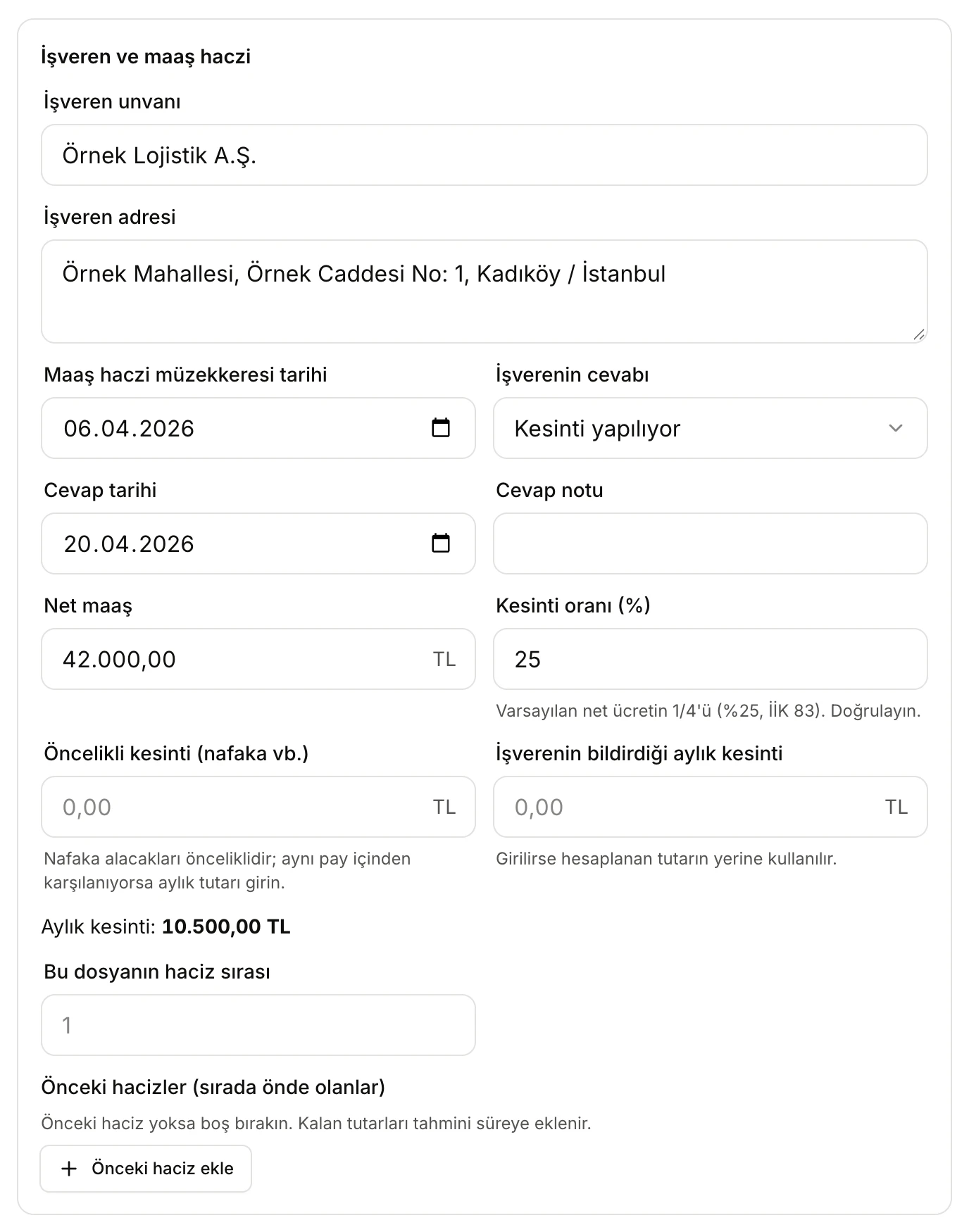
- Maaş haczi müzekkeresi tarihi (date of the garnishment order), İşverenin cevabı (employer's answer) and its date: follow-up warnings are based on these.
- Net maaş (Net salary): the debtor's net pay as reported by the employer.
- Kesinti oranı (%) (Deduction rate): 25% by default, i.e. a quarter of net pay (İİK 83).
- Aylık kesinti (Monthly deduction): net salary × rate − priority deduction, or the amount the employer reported.
- Önceki hacizler (Earlier garnishments): garnishments ahead of this file in line, and what they still owe.
- İşveren unvanı (Employer's name) and İşveren adresi (Employer's address). The employer filter in the list is built from the name.
- Maaş haczi müzekkeresi tarihi (Date of the garnishment order).
- İşverenin cevabı (Employer's answer): Cevap bekleniyor (Awaiting answer), Kesinti yapılıyor (Deductions being made), Önceki haciz nedeniyle sırada (In line behind an earlier garnishment), Borçlu çalışmıyor / ayrıldı (Debtor not employed / left) or Diğer (Other); with a Cevap tarihi (Answer date) and Cevap notu (Answer note).
- Net maaş and Kesinti oranı (%). The rate is 25% by default; you can set it between 0 and 100. Check the rate for your file.
- Öncelikli kesinti (nafaka vb.) (Priority deduction, e.g. maintenance): maintenance claims take priority. If maintenance is paid out of the same share, enter its monthly amount; it is subtracted from the monthly deduction.
- İşverenin bildirdiği aylık kesinti (Monthly deduction reported by the employer): if entered, it replaces the computed amount. On the file's page the monthly deduction then reads "(işverenin bildirdiği)" (as reported by the employer).
- The Aylık kesinti line shows the result; without a net salary it reads "net maaş girilince hesaplanır" (computed once a net salary is entered).
- Bu dosyanın haciz sırası (This file's place in line): 1 means first.
- Önceki hacizler (sırada önde olanlar) (Earlier garnishments ahead in line): add each with Önceki haciz ekle (Add earlier garnishment), with its office and file number; enter what it still owes if you know it, or leave it empty ("Kalan (bilinmiyor)", remaining unknown). The remaining amounts are added to the estimated time.
Follow-up section
- Sonraki kontrol tarihi (Next check date): when this date arrives, the file joins the files that need attention.
- Notlar (Notes): up to 4000 characters.
At the bottom of the form, Vazgeç (Cancel) discards your changes and Dosyayı ekle (when editing, Kaydet, Save) saves.
Filling from a UYAP document
The UYAP belgesinden doldur button above the form helps you fill fields from a payment order, a request for enforcement or a wage garnishment order. The document's text is sent to the AI service; the AI suggests fields, and nothing is written into the form until you select and transfer it.
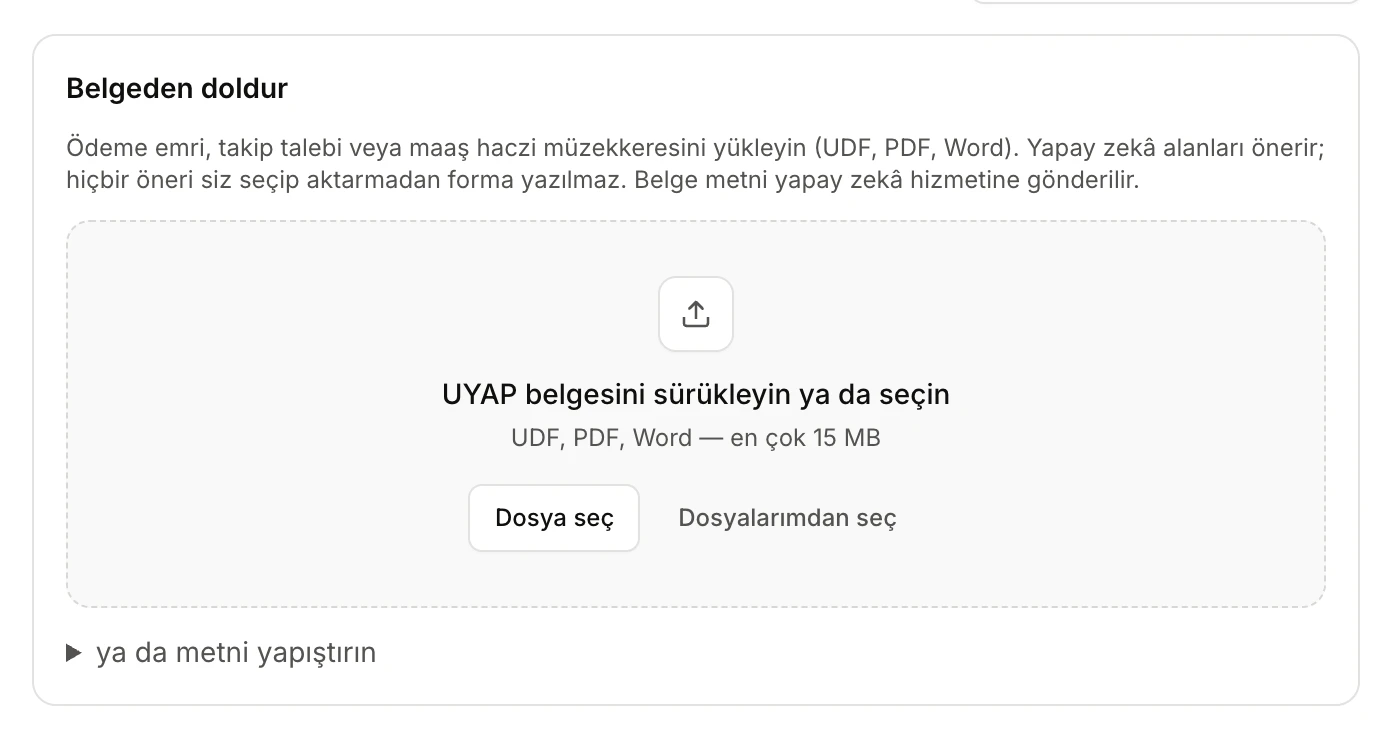
- What you can upload, and the notice that the document's text is sent to the AI service.
- Drag the document here, or pick it from your computer with Dosya seç (Choose file) or from your Vesika files with Dosyalarımdan seç (Choose from my files).
- ya da metni yapıştırın (or paste the text): to copy and paste the document's text instead.
- Choose the document. Accepted types are UDF, PDF, Word (.docx, .doc), .txt and .rtf, up to 15 MB. Or open ya da metni yapıştırın, paste the text and click Alanları öner (Suggest fields); at least 20 characters are needed.
- The tool first reads the document ("… okunuyor…", reading), then extracts the fields ("Alanlar çıkarılıyor…", extracting fields). While extraction runs you can stop it with Durdur (Stop).
- A list headed Yapay zekâ önerisi — kontrol edin (AI suggestion — check it) appears. Each row shows a field and the suggested value; all are ticked. Untick any you do not want.
- Click Seçilenleri forma aktar (N) (Transfer selected to the form). The values are written into the form and a notice reminds you to check them before saving. Check the form and save.
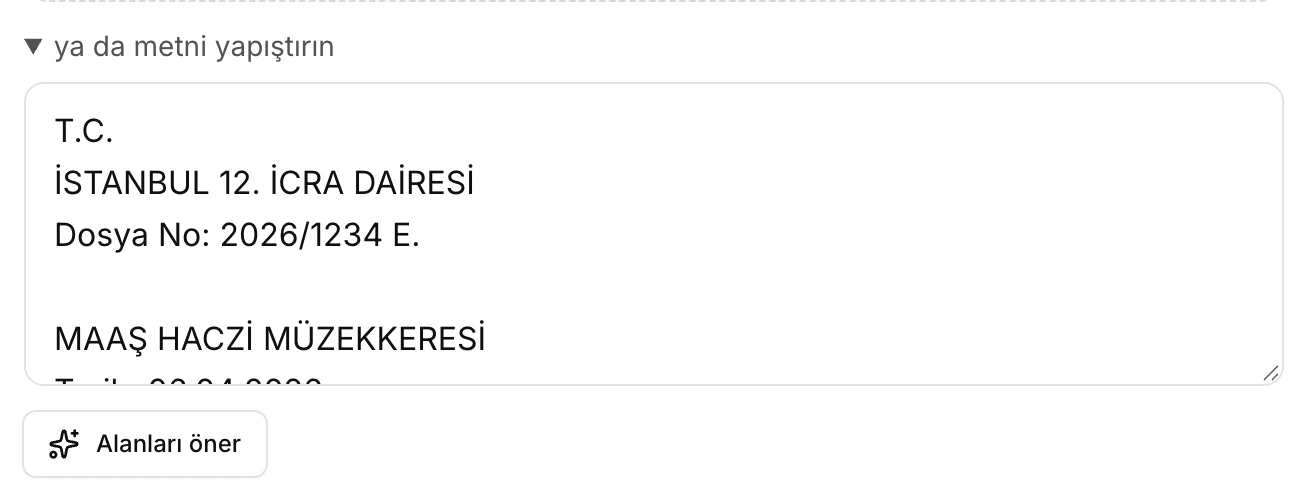
- The document's text. The order in this example was written for this guide; the people and companies are fictitious.
- Alanları öner (Suggest fields) sends the text to the AI and opens the list of suggestions.
The fields that can be suggested are: file number, enforcement office, type of proceedings, date of proceedings, creditor, debtor, debtor's ID number, principal, interest, costs, attorney's fee, employer, employer's address and date of the garnishment order. The AI is told to extract only what the document states plainly; fields the document does not contain are not suggested. If a suggested ID number fails the checksum, it is marked "(doğrulama başarısız — kontrol edin)" (check failed — verify). Net salary, the employer's answer and deduction details are not taken from the document; you enter them.
- Only the first 40,000 characters of a document are read; for longer documents the warning "Belge uzun olduğu için yalnızca ilk kısmı okundu." (only the first part was read) appears.
- An uploaded document is kept in your Dosyalar (Files) and can be opened in the side panel with Aç (Open). When you transfer suggestions and save the file, the document is linked in the Belgeler (Documents) row of the file's page.
- If you have reached your AI limit, a "Yapay zekâ sınırına ulaşıldı" (AI limit reached) notice appears and this feature cannot be used; you can still fill in the fields by hand.
Suggestions are AI output and can be wrong or incomplete. Compare every transferred value with the document, especially amounts, dates and the ID number.
The file's page
Click a file in the list to open its page on the right.
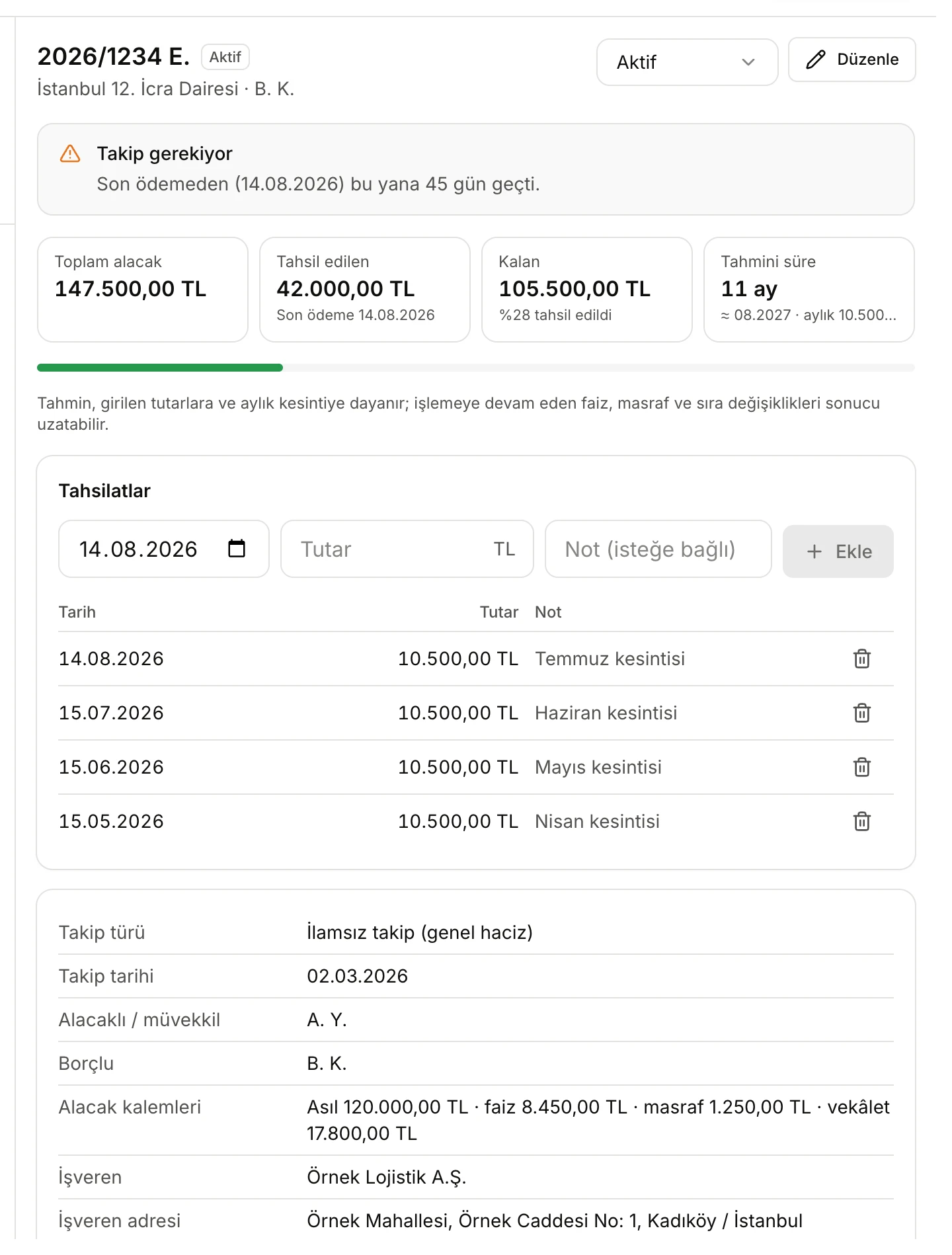
- The status list and Düzenle (Edit). A status changed here is saved at once.
- Takip gerekiyor (Follow-up needed): 45 days have passed since the last payment in this file.
- Toplam alacak (Total claim), Tahsil edilen (Collected, with the last payment date), Kalan (Remaining, with the share collected) and Tahmini süre (Estimated time).
- A new collection: date, amount and an optional note, then Ekle (Add).
- Collections, newest first. The bin icon deletes a collection.
Adding a collection
Add every deduction received from the employer under Tahsilatlar: choose the date, type the amount, optionally add a note (up to 200 characters) and click Ekle. Collected, remaining and estimated time update at once. Delete a wrong entry with the bin icon on its row; this does not ask for confirmation.
Estimated time
The estimated time is how many months the remaining amount will take at the monthly deduction:
- First the remaining amounts of the garnishments ahead in line are divided by the monthly deduction (waiting time), then this file's remaining amount (its own time); the two are added and written in years and months (e.g. "11 ay", 11 months; "1 yıl 3 ay", 1 year 3 months). Below it the estimated month of completion and the monthly deduction are shown.
- Without a monthly deduction it reads "Net maaş veya kesinti girilmedi" (no net salary or deduction entered).
- If what an earlier garnishment still owes is unknown, no time is computed and it reads "Önceki haciz kalanı bilinmiyor" (earlier garnishment's remainder unknown).
- When nothing remains it reads "Bitti" (Finished).
Under the estimate the tool notes that it is based on the amounts entered and the monthly deduction, and that continuing interest, costs and changes in the order of garnishments can lengthen it.
The file's details
The card below the collections lists everything entered in the form: type and date of proceedings, parties, claim items, employer and address, date of the order, the employer's answer, net salary, how the monthly deduction was found, place in line, earlier garnishments, next check date, documents and notes. To change anything, click Düzenle at the top; the form opens headed Düzenle · 2026/1234 E. (Edit, followed by the file number) and saves with Kaydet.
Files that need attention
In an open file the tool shows a Takip gerekiyor (Follow-up needed) warning when:
| Condition | Warning |
|---|---|
| An order date is entered, the employer's answer is Cevap bekleniyor and the number of days you set (default 15) has passed since the order | "İşveren cevabı N gündür gelmedi (müzekkere …)." (no answer from the employer for N days) |
| Status is Aktif, the employer's answer is Kesinti yapılıyor and the number of days you set (default 45) has passed since the last payment (or, with no payments, since the answer date, or else the order date) | "Son ödemeden (…) bu yana N gün geçti." (N days since the last payment) or "Kesinti bildiriminden bu yana N gündür ödeme kaydı yok." (no payment recorded for N days since deductions were reported) |
| The Sonraki kontrol tarihi has arrived or passed | "Kontrol tarihi geldi (…)." (check date reached) |
In addition, if a file is Aktif and the recorded payments cover the claim, an information note suggests checking the file and marking it Tahsil edildi. Files marked Tahsil edildi or Kapandı get no warnings.
The file list
The list on the left shows all your files.
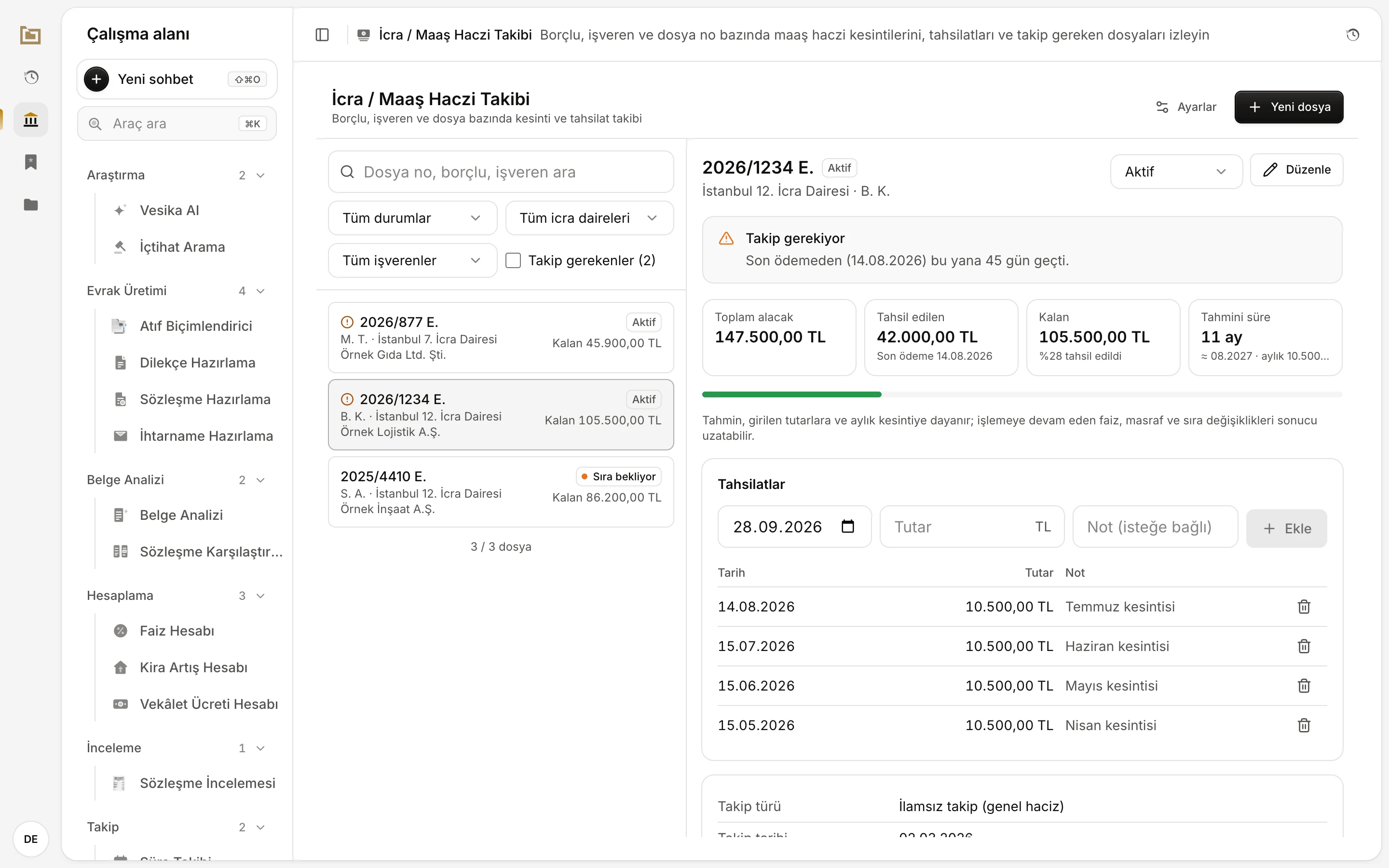
- Search: looks in the file number, debtor, creditor, enforcement office, employer, notes and ID number.
- Filters for status, enforcement office and employer.
- Takip gerekenler (Needs follow-up): shows only files with a warning; the count is in brackets.
- Each row: file number, debtor and office, employer, status and remaining amount. The exclamation icon marks a file that needs follow-up.
- Yeni dosya (New file).
- The selected file's page.
- The list is sorted by status (Aktif, Sıra bekliyor, Tahsil edildi, Kapandı); within a status, files that need follow-up come first, then the most recently updated.
- Below the list you see how many files are shown (e.g. "3 / 3 dosya"); with a filter on, "(filtreli)" (filtered) is added. If no file matches, a Filtreleri temizle (Clear filters) link appears.
Settings and export
The Ayarlar (Settings) button at the top right opens the day limits for follow-up warnings and the bulk export.
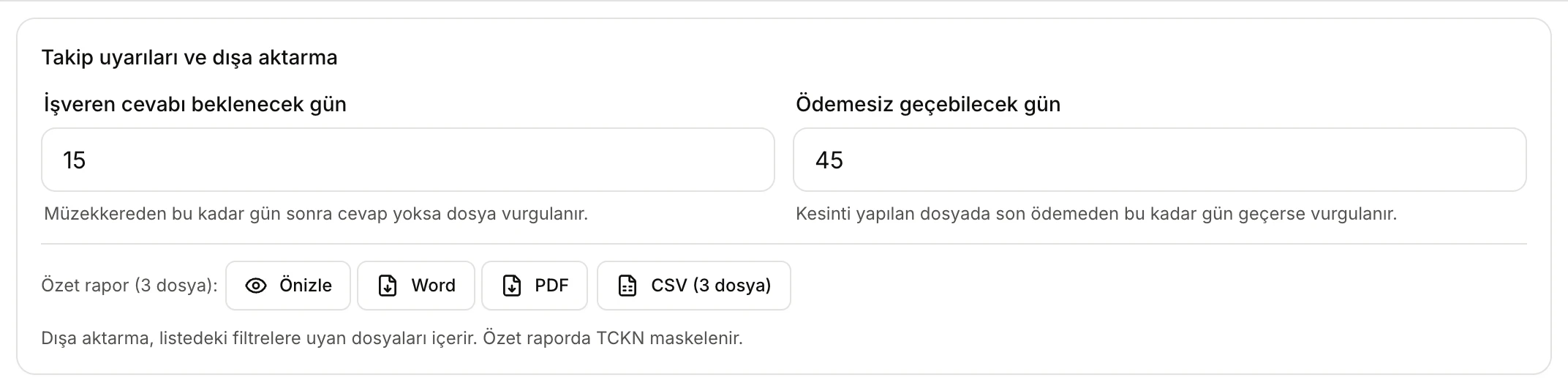
- İşveren cevabı beklenecek gün (Days to wait for the employer's answer): a file is highlighted when no answer arrives within this many days of the order (1–365).
- Ödemesiz geçebilecek gün (Days allowed without payment): a file with deductions is highlighted when this many days pass after the last payment (1–365).
- Özet rapor (Summary report: Preview, Word, PDF) and CSV: for the files matching the list's filters.
The settings are saved to your account.
Bulk export
- Özet rapor (N dosya) (Summary report, N files) summarises the files shown in the list: total claimed, collected and remaining amounts, file counts by status, and for each file the debtor, creditor, status, employer, amounts, monthly deduction, estimated time and follow-up warnings. Önizle (Preview) opens the report in the side panel; Word and PDF download it. If your installation has UYAP conversion, a UDF button also appears. ID numbers are masked in the summary report.
- CSV (N dosya) exports the same files as a table to open in Excel (semicolon-separated, with decimal commas). Each file is a row; the columns are file and party details, claim items, collected and remaining amounts, employer, order and answer, net salary, deduction rate and amount, place in line, estimated time (months), last payment, follow-up warning and notes.
One file's report

- Dosya özeti (File summary): Önizle opens it in the side panel; Word and PDF download it.
- CSV: this file's row only.
- Dosyayı sil (Delete file): after confirmation, deletes the file and its collections.
The İcra dosyası özeti (enforcement file summary) contains all the file's details, the claim and wage garnishment sections, the collections in date order, follow-up warnings and notes. It ends with a note that the amounts are based on user input and that accrued interest and costs must be checked against the current file account. Reports you create are also kept in your Dosyalar (Files).
The file summary and the CSV file contain the debtor's ID number unmasked. Check these files before you share them.
Deleting a file
Click Dosyayı sil at the bottom of the file's page and confirm "Dosya ve tahsilat kayıtları silinsin mi?" (delete the file and its collections?) with Sil (Delete). A deleted file cannot be restored and also disappears from the Geçmiş panel.
Limits and things to check
- All amounts are what you enter. The tool does not run interest, track costs or fetch anything from UYAP; update the claim items as the file's account changes.
- The 25% (one quarter) default rate is the general rule. For maintenance priority and other special cases, enter the rate and priority deduction that apply to your file and check them.
- The estimated time is for information; interest, costs and changes in the order of garnishments can lengthen the real time.
- Follow-up warnings depend only on the dates you enter and today's date; the tool sends no notifications.
- UYAP belgesinden doldur uses AI; suggestions can be wrong, and the document's text is sent to the AI service. Upload documents containing personal data such as ID numbers with that in mind.
- The file summary and the CSV contain the ID number in full; the summary report masks it.