Tips for better answers
Vesika AI searches the legal database for your question in several different wordings, reads the decisions and articles it finds and bases its answer on them. The clearer your question, the better the search. The tips on this page are based on how the assistant works.
Workspace → Araştırma (Research) → Vesika AI
Step by step: a good question
- Give the facts briefly: who, when, what happened, what you want.
- Name the area of law or an article you know.
- Give the relevant dates and period.
- Attach the relevant document.
- Choose sources and depth to suit the difficulty of the question.
- When the answer arrives, open and check its citations.
Example: "The tenant has lived in the same home since 2019 and the lease states no increase rate. The landlord wants to bring a rent determination action this year. How is the new rent set, and does the five-year rule of TBK m. 344 apply here?"
How to write your question
Give the facts
The assistant is asked, when an answer depends on facts you did not give, to say which information it needs rather than assume. Giving the facts up front saves that round. Sometimes the assistant pauses the answer and asks you a multiple-choice question (Asking a question); answering it helps it continue more accurately.
You do not need to give names: roles or initials such as "tenant", "employer" or "A.B." are enough.
Name the area and the article
The assistant searches the database both in your wording and in the formal term used in decisions, as well as by law and article number ("TBK 49"). Naming the area of law or the relevant article steers these searches to the right place. Put an article you are unsure about as a question: "Does this fall under TBK m. 72?"
Give dates and the period
- Give the dates of the event and the transaction; the applicable provision often depends on them.
- If you want decisions from a particular period, say so explicitly: "decisions from the last five years", "decisions after 2020". Otherwise the assistant searches decisions without a date limit.
- No period limit is applied to legislation, because a law's date is its adoption date. For an older event, ask separately about the text in force on that date and check it in the reader's versions (The document reader).
Say what you want
- Say whether you want a short conclusion, a comparative summary of case law or a draft.
- An answer gives the conclusion first, then the reasoning. The assistant tries to separate what the law says from how it is applied in practice, and to mention differing views between chambers; if you particularly need this, ask for it: "Do the chambers take different views?"
- If you want a document as a file, say so and give the format: "prepare it as Word", "give it as UDF" (Having documents drafted).
- The answer comes in the language of your question: ask in Turkish for Turkish, in English for English.
One matter per question
A very broad question needs a great many searches. If the assistant goes over its research budget, it stops searching and writes from the sources it has. With very broad questions you may see the notice Asistan araştırma sınırına ulaştı… (The assistant reached its research limit…) or Bu soru için bulunan kaynaklar modelin işleyebileceğinden uzun. Soruyu daraltıp tekrar deneyin. (The sources found for this question are longer than the model can process. Narrow the question and try again.) In that case split the question: first the rule, then the exception, then the procedure.
Attach the document
If your question is about a contract, petition or decision, attach the document itself instead of summarising it. The assistant reads it and bases its answer on it. Say which part you are interested in: "Is the increase clause in article 3 valid?" Details: Attaching files.
Choose sources and depth
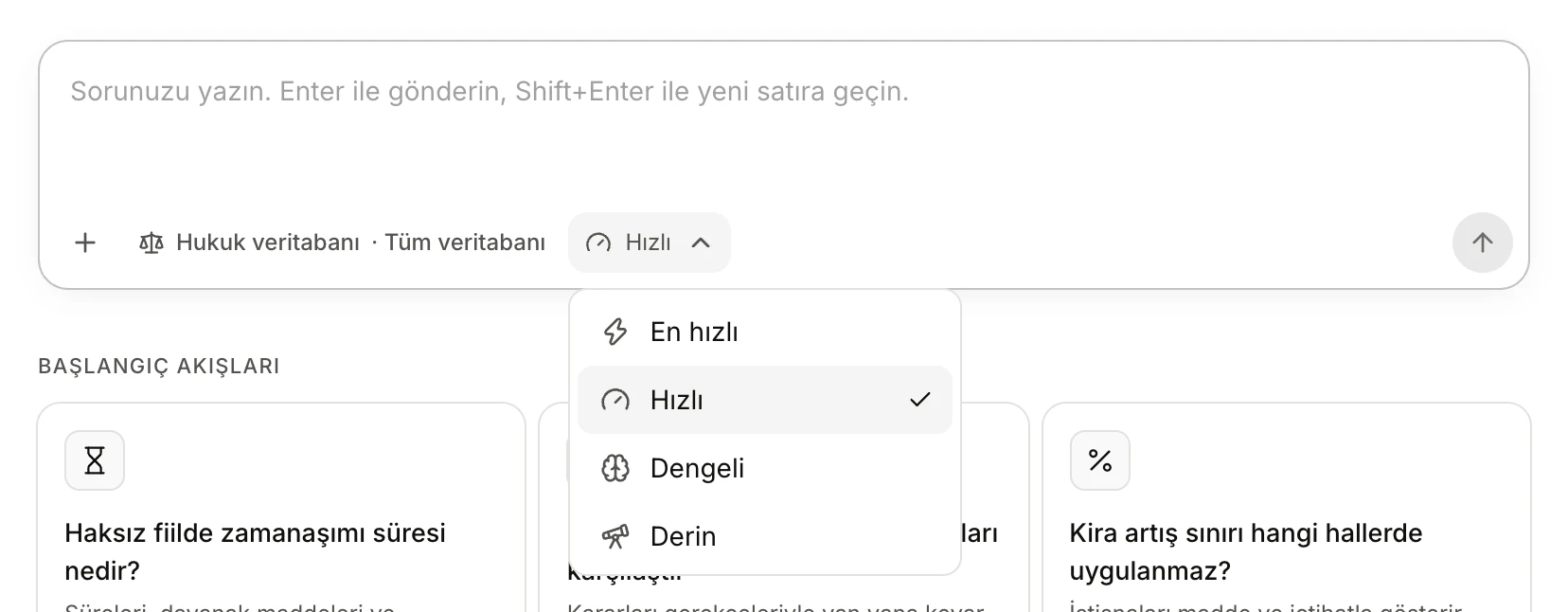
- The selected depth.
- Derin (Deep) for hard, many-sided questions.
- Sources: If you want decisions from a particular court only, or legislation only, select those sections in the Hukuk veritabanı (legal database) panel. Your selection stays in effect for later conversations; when you are done, remember to turn everything back on with Tümünü seç (Select all).
- Depth: For everyday questions the default Hızlı (Fast) is enough. For questions with several issues, a comparison of case law or exceptions, choose Dengeli (Balanced) or Derin (Deep); the assistant thinks longer and looks at more sources, and the answer takes longer. Derin may have a monthly limit.
- For a simple definition or a single article, En hızlı (Fastest) may be enough.
Details: Asking a question.
Verify citations
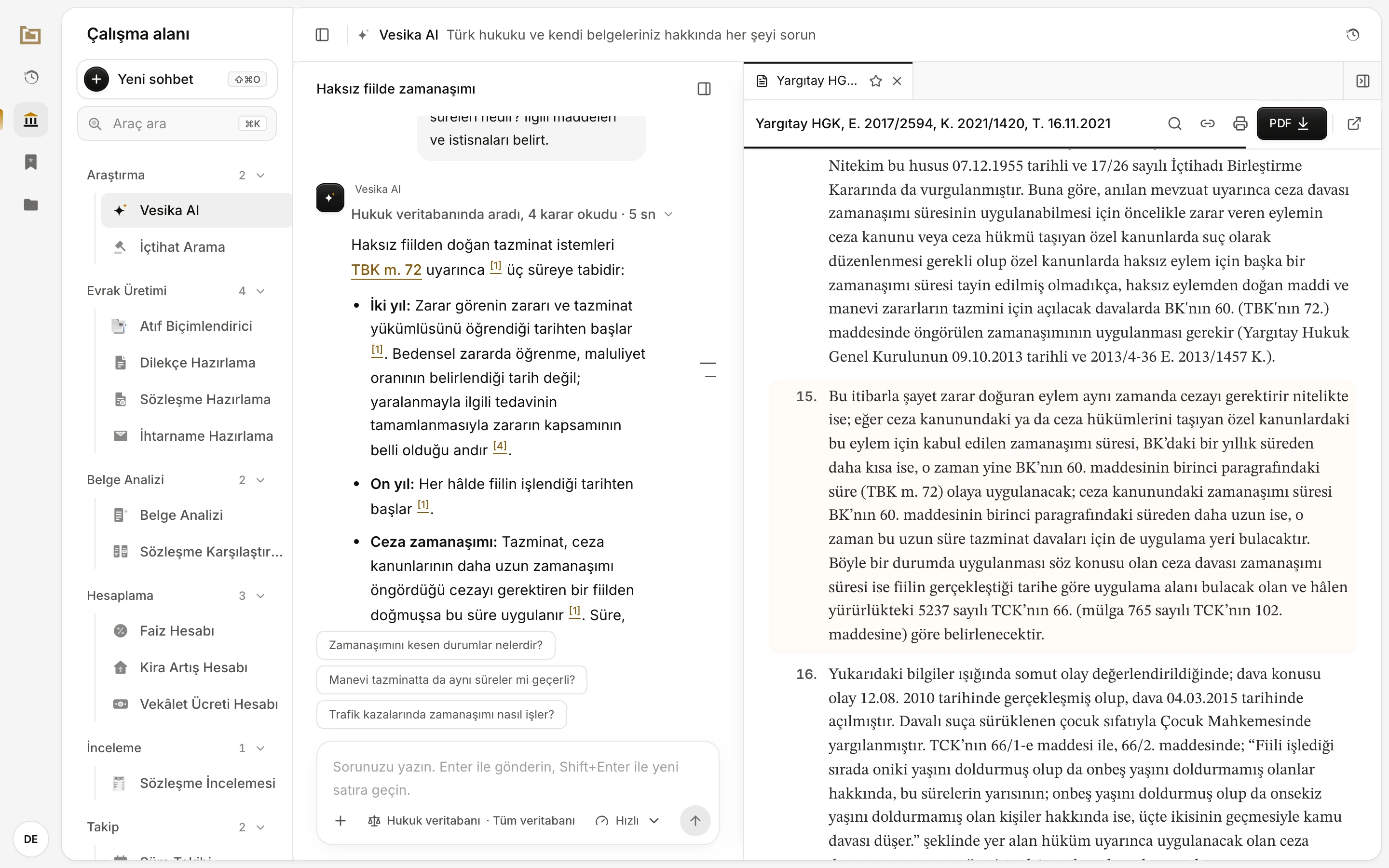
- Click the numbered citation.
- Read the highlighted passage: does it support the sentence in the answer?
- Check the reference here.
- Numbered citations ([1], [2]) lead to documents the assistant read in the database. The assistant is asked to link only documents it has read. Still, open each one; a decision opens with the passage relied on highlighted.
- Statute links are created from the article named in the answer. The link opens the right article, but read it to check that the article supports the answer's interpretation.
- References without links: A decision reference with no number or link may come from the assistant's own knowledge rather than the database. Look these up with Case-law search.
- The assistant is asked to say when it is unsure of a reference. When you see a phrase such as "the citation needs to be verified", always check that citation against its source.
- The side panel's Bağlam (Context) → Kaynaklar (Sources) tab shows all of the conversation's sources together (The side panel).
What the assistant does not do
- It is asked not to invent article, docket or decision numbers, dates or quotations. It can still make mistakes; check the citations.
- It does not link documents it has not read, and it gives no numbered citation to documents that did not come from the database.
- When you turn off the legal database, it does not search the database; it says it cannot reach the database and answers from its own knowledge.
- It does not write information it does not know into drafts: missing information is left as [DOLDURULACAK] (to be filled in).
- It does not add disclaimers such as "this is not legal advice"; it answers directly on the assumption that it is talking to a lawyer. That does not mean the answer is correct.
- It cannot be steered while writing: you cannot add an instruction to an answer that is being written. If needed, press Durdur (Stop) and ask again.
Vesika AI is a research assistant. Its answers can contain wrong, incomplete or outdated information. Do not carry an answer into a petition, an opinion or advice to a client without reading its sources.
Limits and things to check
- The assistant can only give numbered citations to documents in Vesika's legal database. What it says about a decision not in the database cannot be verified there.
- Asking the same question again may produce a different answer. Compare the sources before relying on an important conclusion.