Favorites
The Favoriler (Favorites) tab gathers the Vesika AI answers and İçtihat Arama decisions you starred. Favorites belong to your account: a decision starred on the iPhone appears in Favorites on vesika.ai, and an answer or conversation starred on the web appears on the iPhone.
App → Favoriler tab (the third tab)
What can be starred
| Where | How | In Favorites |
|---|---|---|
| A Vesika AI answer | The star under the answer (Favorilere ekle, Add to favorites) | Yanıtlar (Answers) |
| An İçtihat Arama decision | The star on the decision card, or long-press the card → Favorilere ekle | Kararlar (Decisions) |
| A conversation, a search | Only on the web | Sohbetler (Conversations), Aramalar (Searches) |
The document reader has no star. An answer can be starred once the conversation is saved and the answer has finished; the favorite is named after your question.
Step by step
- Tap the star of an answer or a decision. It fills.
- Open the Favoriler tab.
- Tap a favorite to open it.
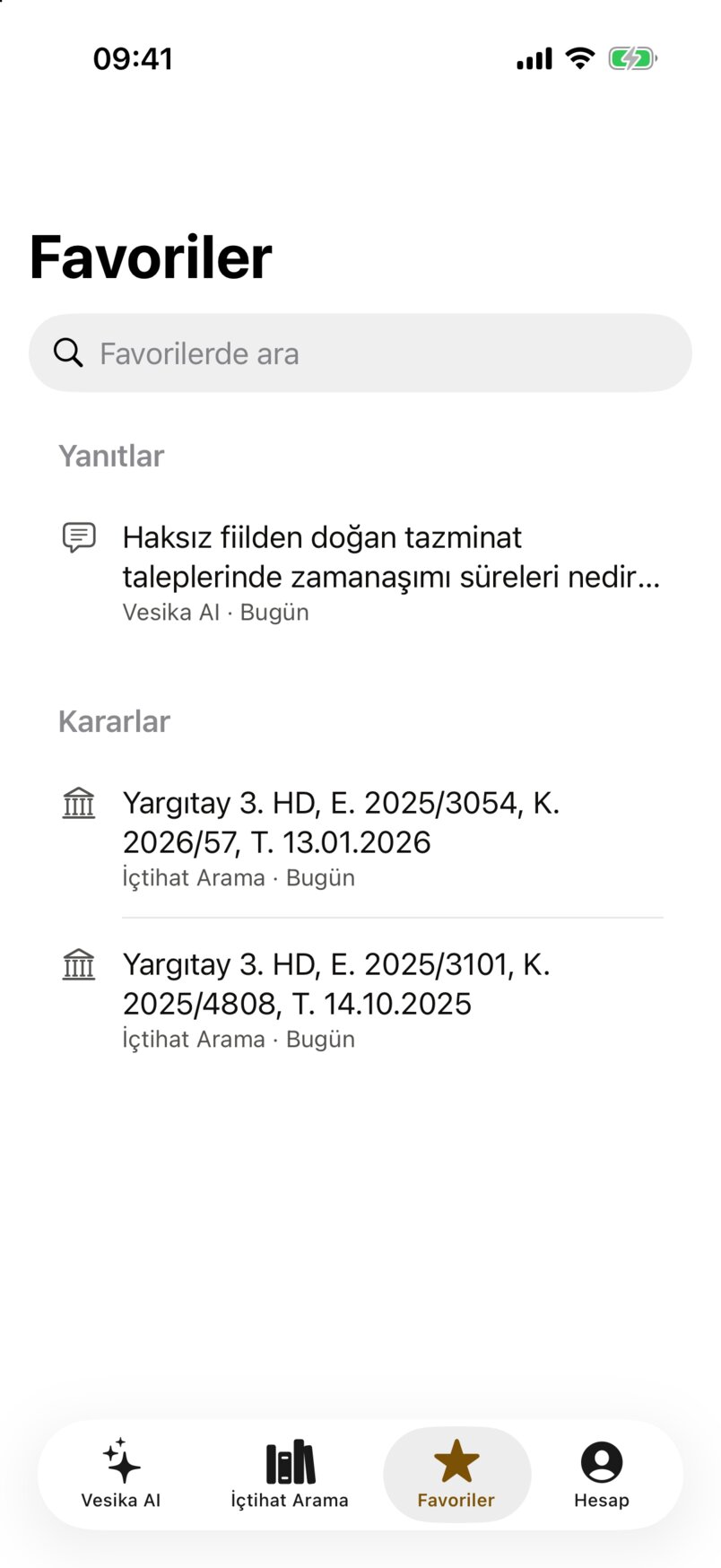
- Favorilerde ara (Search favorites): searches the titles, ignoring case and Turkish accents.
- Yanıtlar (Answers): opens the conversation in Vesika AI at that answer.
- Kararlar (Decisions): opens the decision in the document reader.
Favorites are listed under Yanıtlar, Sohbetler, Kararlar and Aramalar, most recently used first in each; empty sections are hidden. Each row has an icon, the title and a line such as "Vesika AI · Bugün" (today) or "İçtihat Arama · 28 Eylül 2026".
- A conversation favorite opens that conversation in Vesika AI.
- A search favorite switches to İçtihat Arama and runs the saved search again (question, emphasis, filters). Searches by document come back with their summary and questions.
Removing a favorite
- Swipe the row left → Favorilerden çıkar (Remove from favorites; a full swipe removes it directly), or long-press the row → Favorilerden çıkar.
- There is no confirmation; the row disappears at once. If the server refuses, the row comes back with "Favorilerden çıkarılamadı" (Could not remove from favorites).
- Tapping a filled star on an answer or decision card again also removes it.
Removing a favorite only clears the star; the conversation or search history is not deleted.
Syncing with vesika.ai
Favorites are the same records as Geçmiş (History) → Favoriler on vesika.ai. The list refreshes when you open the tab, when you return to the app, and when you pull it down. A star added or removed on one side appears on the other.
Limits and things to check
- The app shows only Vesika AI and İçtihat Arama favorites. Favorites of other web tools and side-panel favorites (documents, files) do not appear in the app.
- The first 100 favorites are listed.
- İçtihat Arama favorites appear only while İçtihat Arama is enabled for your account.
- With no favorites it says "Henüz favoriniz yok" (You have no favorites yet).